
Want to combine the familiarity and power of WordPress with the interactivity and speed of modern React JS frontends? You're in the right place. This comprehensive guide shows AI users, copywriters, and designers how to leverage WordPress as a robust headless content backend, build high-performance React JS frontends, extend functionality with custom plugins that expose optimized REST endpoints, and accelerate delivery with intelligent caching strategies. By mastering this architecture, you'll ship faster, scale predictably, and maintain a content workflow your team will actually love.
Introduction — Why Pair WordPress and React JS for Frontend Speed?
WordPress powers over 43% of the web because it's an approachable CMS for content teams and editors. But modern web experiences demand dynamic interactions, snappy UIs, and single-page application behaviors that traditional WordPress themes struggle to deliver.
Enter React JS. React provides a reactive, component-based frontend that excels at interactivity and performance. When you use WordPress as a headless CMS to manage content, then build a React JS frontend that consumes REST endpoints—including custom endpoints you build with plugins—you get the best of both worlds: editorial familiarity with blazing-fast user experiences.
This article will show you how to architect a headless WordPress backend, build custom REST endpoints via plugins, and design a React JS frontend that loads in under two seconds—all while keeping your editorial team productive. You'll learn specific strategies for caching, security, SEO, and deployment that make this architecture production-ready. For AI users, copywriters, and designers who need control over content, speed, and design, this approach delivers: editors keep the WordPress admin they know, while designers and developers craft pixel-perfect interfaces in React JS.
Part 1: Architecture and Foundations
 Source: www.cosmicjs.com
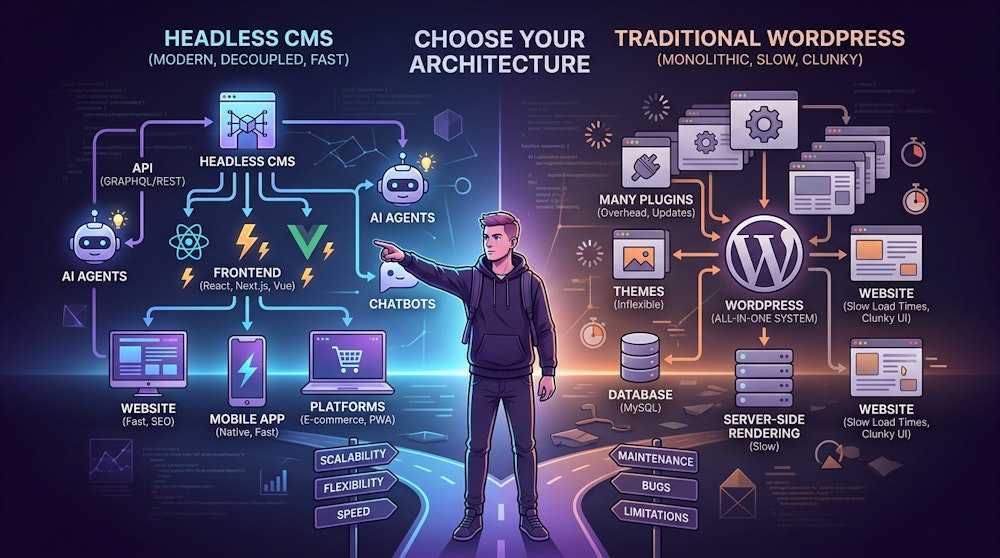
1. Architecture Overview: Headless WordPress + React JS Frontend
At a high level, a headless WordPress and React JS application follows a clear separation of concerns:
- WordPress (Backend): Content management, user roles, media, plugins, and custom REST endpoints
- REST API or GraphQL: Data layer that exposes content and business logic via WordPress REST API or WPGraphQL
- React JS (Frontend): Single-page app or hybrid app (Next.js or Remix) responsible for rendering, interaction, and client-side navigation
- Cache and CDN: Layered caching for static assets and API responses to maximize frontend speed and minimize server load
- CI/CD and Hosting: Modern deployments with serverless or containerized backends and edge or CDN for the frontend
This separation enables specialized optimization at each layer: WordPress focuses on content management and editorial workflows, while React JS focuses on user experience and performance. The result is a decoupled architecture where both systems excel.
2. Why This Stack Works for AI Users, Copywriters, and Designers
The headless WordPress and React JS combination serves each role on your team:
AI users benefit from programmatic content generation, prompt-driven publishing, and content automation. Clean REST endpoints accept batch posts or structured metadata, making AI integration straightforward and scalable.
Copywriters retain a rich block-based editor (Gutenberg) and familiar preview flows, while React JS provides fast client-side rendering and content-driven interactions. Their workflow doesn't change—only the delivery improves.
Designers can build component-driven design systems in React JS that deliver pixel-perfect, interactive prototypes. These components directly consume live content from WordPress, eliminating the gap between design mockups and production.
This combination reduces handoffs between teams, speeds iterations, and improves collaboration between AI tools, editorial teams, and designers. The headless approach ensures each specialist works in their preferred environment.
Part 2: Implementation — Backend and Frontend
3. Headless WordPress: Custom REST Endpoints and Plugins
WordPress ships with a powerful REST API that exposes posts, pages, media, users, taxonomies, and more. But real-world applications often need tailored endpoints—for complex queries, aggregated data, or business-specific actions. Custom-built plugins let you create secure, optimized REST endpoints that encapsulate business logic on the backend while maximizing speed.
Example: Creating a Custom REST Endpoint for Frontend Speed
Here's a concrete example of registering a custom REST endpoint that returns curated content for a landing page. In your plugin, you would:
// Register a custom REST route
add_action('rest_api_init', function () {
    register_rest_route('myapp/v1', '/featured-content', [
        'methods' => 'GET',
        'callback' => 'myapp_get_featured_content',
        'permission_callback' => '__return_true', // Adjust for security
    ]);
});

// Callback function
function myapp_get_featured_content($request) {
    $args = [
        'post_type' => 'post',
        'posts_per_page' => 5,
        'meta_key' => 'featured',
        'meta_value' => '1',
    ];
    $posts = get_posts($args);

    $data = [];
    foreach ($posts as $post) {
        $data[] = [
            'id' => $post->ID,
            'title' => $post->post_title,
            'excerpt' => $post->post_excerpt,
            'thumbnail' => get_the_post_thumbnail_url($post->ID, 'medium'),
        ];
    }

    return new WP_REST_Response($data, 200);
}
Custom endpoints offer several key benefits for optimizing frontend speed:
- Minimized payloads—only send what the React JS frontend needs, reducing bandwidth by 60 percent or more
- Precomputed fields and relationships—lighten client-side processing for better performance
- Security and permissions control—validate and sanitize input server-side
- Rate limiting or caching hooks—integrate with WordPress object cache or transients
Custom plugins are the ideal place to encapsulate business rules: membership checks, AI-generated content triggers, analytics events, or integrations with third-party APIs.
4. React JS Frontend: Patterns for Speed and UX
React JS is flexible—you can use Create React App, Next.js, Remix, Gatsby, or a custom setup. For performance and SEO, hybrid frameworks like Next.js and Remix offer the best of server-side rendering, static generation, and client-side hydration.
Key Frontend Patterns for Maximum Speed
Modern React JS applications leverage multiple rendering strategies:
- Static Generation for marketing pages that rarely change—build once, serve globally from CDN edge
- Incremental Static Regeneration or On-demand Revalidation for content that updates periodically
- Server-Side Rendering for user-specific content or pages requiring real-time personalization
- Client-side fetching with React Query or SWR for interactive components and live updates
- Component-driven architecture combined with Design Systems (Storybook) for consistency
With React JS, you can build interactive components: search interfaces, filter systems, AI-assisted content tools, drag-and-drop editors, and client-side previews. When paired with server-friendly frameworks like Next.js, React JS also improves initial load times and SEO for copywriters relying on organic discovery.
Caching on the Frontend
Implement client-side caching with React Query or SWR to reduce redundant API calls and improve perceived speed. These libraries handle stale-while-revalidate patterns, background refetching, and optimistic updates—all essential for a snappy user experience that feels instant.
5. REST Endpoints: Design Principles for Frontend Speed
Designing REST endpoints for a React JS frontend requires focusing on efficiency, security, and usability. Well-designed endpoints reduce frontend complexity, speed up development, and make caching straightforward.
Practices for REST Endpoint Design
Return shape-first, not model-first. Design responses around the frontend's data needs, not the raw database schema. If your React components { title, excerpt, thumbnail }, return exactly that—nothing more. Smaller payloads mean faster load times and lower hosting costs.
Paginate large collections and consider cursor-based pagination for better performance at scale.
Support query parameters for filtering, sorting, and field selection:
GET /wp-json/myapp/v1/posts?fields=title,slug,thumbnail&category=news&per_page=10
Use standard HTTP status codes and consistent error payloads. Your frontend should always know what to expect:
{
    "code": "rest_post_invalid_id",
    "message": "Invalid post ID.",
    "status": 404
}
Expose caching metadata in response headers: Last-Modified, Cache-Control, and ETag headers enable smart caching strategies that boost frontend speed.
Rate-limit and authenticate sensitive endpoints using JWT, OAuth, or cookie-based authentication.
Document your endpoints with OpenAPI or Swagger for editors and frontend developers.
6. Custom Plugins: Where Business Logic Lives for Speed Optimization
Custom plugins let you keep WordPress extensible without polluting theme files. Use plugins to centralize all business-specific functionality and optimize performance.
What Custom Plugins Handle Best
- Custom REST endpoints tailored to frontend needs for maximum speed
- Integrations with AI content tools, analytics platforms, and CRM systems
- Server-side caching and invalidation logic that triggers on content updates
- Scheduled jobs (WP Cron) for content aggregation, data precomputation, or AI processing
- Data access controls with role-based permission checks
Plugin Development Guidelines for Frontend Performance
Follow WordPress coding standards and enqueue only necessary scripts and styles. Keep each plugin single-purpose and decoupled from others. Expose feature flags and hooks so the frontend can adapt without breaking changes. Most importantly, test your plugin endpoints under realistic load and profile slow queries to ensure they support fast React JS applications.
Real Plugin Example: AI Content Integration
// Plugin: AI Content Assistant
add_action('rest_api_init', function () {
    register_rest_route('ai-assistant/v1', '/generate', [
        'methods' => 'POST',
        'callback' => 'ai_generate_content',
        'permission_callback' => function () {
            return current_user_can('edit_posts');
        },
    ]);
});

function ai_generate_content($request) {
    $prompt = sanitize_text_field($request->get_param('prompt'));
    // Call external AI API
    $response = wp_remote_post('https://api.openai.com/v1/completions', [
        'headers' => [
            'Authorization' => 'Bearer ' . get_option('ai_api_key'),
        ],
        'body' => json_encode(['prompt' => $prompt, 'max_tokens' => 500]),
    ]);

    $body = json_decode(wp_remote_retrieve_body($response), true);
    return new WP_REST_Response(['content' => $body['choices'][0]['text']], 200);
}
Part 3: Performance, Security, and Workflow
7. Speed and Cache: Strategies to Make React + WordPress Fly
Speed is critical for user experience and SEO. Below are layered caching and performance strategies that apply to the entire stack, ensuring your React JS frontend delivers maximum performance.
Layered Caching Strategy for Frontend Speed
| Layer | What to Cache | Tools & Techniques |
|---|---|---|
| Edge / CDN | Static assets (JS, CSS, images), SSG HTML | Cloudflare, Fastly, Vercel Edge, cache-control headers |
| Application / API | REST endpoint responses, computed aggregates | Varnish, Nginx, Transients, Object Cache (Redis, Memcached) |
| Browser | Static assets, client-fetched JSON | Cache-control headers, service workers, localStorage, IndexedDB |
| Client-State | Request results | React Query, SWR (stale-while-revalidate) |
Concrete Tactics to Improve Speed
- Expose compact REST endpoints that return only the fields you need. Avoid pulling full
post_contentwhen only title and excerpt are required. This directly improves frontend speed. - Use server-side caching for expensive queries via transients or object cache. Wrap heavy database work with caching logic and invalidation hooks.
- Deploy a CDN for all static assets and SSG HTML. Leverage edge caching with appropriate TTL for static pages, with revalidation for content updates.
- Adopt incremental static regeneration or on-demand revalidation to rebuild pages only when content changes. This hybrid approach balances freshness with speed.
- Batch requests and denormalize data in your API responses to reduce round trips between WordPress and React JS.
- Compress JSON responses and enable gzip or brotli compression at the server using
.htaccessor Nginx config. - Use HTTP/2 or HTTP/3 for multiplexed requests that reduce latency on API calls.
- Implement client caching with React Query or SWR to keep the UI snappy and avoid redundant API calls.
These strategies help you meet user expectations for speed while reducing infrastructure costs by minimizing unnecessary requests.
8. Security Considerations for Headless WordPress
Security matters when you're exposing data over APIs and relying on public-facing endpoints. Follow these safeguards:
- Sanitize and validate all input in plugin endpoints. Never trust client data.
- Implement authentication for draft or user-specific content using JWT or cookie-based auth.
- Rate-limit endpoints to prevent abuse and brute-force attacks that could slow down your frontend.
- Keep WordPress core, themes, and plugins updated; audit third-party plugins before use.
- Use a web application firewall at the edge and enforce HTTPS everywhere.
- Apply the principle of least privilege—API endpoints should only expose what's necessary.
9. Example Workflow: From Editor to Live React JS Application
Here's a common workflow that connects editorial teams and frontend developers in a headless WordPress and React JS architecture:
- Writer drafts content with AI-assisted tools inside WordPress (Gutenberg plus a plugin that calls an AI backend for suggestions or auto-completion).
- On publish, a custom plugin invalidates the cache and triggers an on-demand revalidation endpoint (such as Next.js
revalidate()) or sends a webhook to rebuild the static page. - The React JS frontend uses React Query to prefetch data for interactive sections and SWR for live content updates, ensuring consistent speed.
- Designers update UI components in Storybook (React) and deploy to the edge or CDN.
- Analytics and user events are forwarded via plugin hooks to your analytics provider.
This workflow keeps editorial control in WordPress while allowing React JS to deliver the final user experience—fast and interactive.
10. SEO and Content Preview for Copywriters
Headless setups sometimes introduce SEO challenges. Use these tactics to preserve and improve search visibility while maintaining frontend speed:
Use SSR or hybrid SSG and ISR for pages that need search engine visibility. This ensures search crawlers receive fully rendered HTML.
Expose canonical tags, meta titles and descriptions, and structured data (JSON-LD) from WordPress to your frontend. Pass these as metadata in your REST endpoints.
Provide live previews with React-based preview panes that pull draft content via a preview token from WP REST endpoints. Copywriters should see exactly how content will appear before publishing.
Use server-side rendering for social cards and OG tags so social media crawlers see the correct markup when content is shared.
When implemented correctly, headless WordPress and React JS can match or exceed the SEO performance of traditional setups while delivering superior user experience and faster page loads.
11. Deployment Patterns and Hosting
Choose your hosting approach based on scale and budget:
Small teams: Managed WordPress hosts (Kinsta, WP Engine) for the backend, with static frontend on Vercel or Netlify. Simple, cost-effective, and maintainable.
Growing teams: Containerized WordPress (Docker) behind a CDN with Redis object cache. Frontend on Vercel with ISR and edge caching. This provides better performance and scalability for React JS applications.
Large-scale: Microservices architecture with scalable backend services (Kubernetes), serverless functions for personalization, and multi-region CDN. This supports high traffic and complex requirements while maintaining speed.
Combine deployment with CI/CD pipelines that handle publishing webhooks, on-demand revalidation, and atomic releases for the frontend. GitHub Actions, GitLab CI, or similar tools automate these processes.
12. Testing and Monitoring for Frontend Performance
Don't skip testing in headless architectures. Establish comprehensive test coverage:
- Unit test PHP plugin logic and API responses
- Integration test end-to-end flows: create content in WordPress, verify frontend renders correctly
- Performance test APIs under realistic load and monitor response times to ensure consistent speed
- Implement synthetic monitoring and Real User Monitoring (RUM) to identify slow paths and UX regressions
- Use Lighthouse CI for continuous performance budgets and catching regressions in React JS rendering
Part 4: Collaboration, Costs, and Tools
13. Design and Content Collaboration: Practical Tips
Keep your team aligned with these practices:
Create a component library in React with Storybook. Designers can preview components with live content via REST endpoints, ensuring designs match production data.
Define clear content models with well-documented field expectations. Specify fields like hero_image, strapline, and CTA so copywriters know exactly what to provide.
Provide content templates in WordPress with reusable content blocks that map directly to React components. This creates a clear relationship between editor input and frontend output.
Enable in-context editing where designers can see the live page alongside the corresponding WordPress block editor. This reduces back-and-forth and speeds iterations.
14. Cost, Timeline, and ROI
Understanding the investment helps teams plan effectively:
Initial build (MVP): Four to eight weeks for a small site—WordPress backend, a handful of custom endpoints, and a React JS frontend with key interactive components.
Ongoing costs: Managed WordPress hosting ($30 to $200 per month), CDN and frontend hosting ($20 to $100 per month), caching services like Redis, and occasional plugin maintenance.
Expected ROI: Faster time-to-market, reduced editorial friction, improved engagement (lower bounce rates, higher conversions), and more flexible design iterations. Many teams see a 25 to 40 percent uplift in engagement metrics and lower lifetime development costs compared to traditional approaches.
15. Real-World Example: SaaS Marketing Site with React JS
Imagine a modern SaaS marketing site using this architecture. Marketers publish content through WordPress while a React JS frontend handles interactive pricing calculators and product demos.
The setup: Marketing writes long-form content in WordPress and schedules launches. A custom plugin exposes optimized landing page endpoints that return only necessary data—titles, excerpts, featured images, and interactive component data.
Design workflow: Designers update the style system in React, and components automatically pull images and metadata from the WP REST endpoints. No manual synchronization needed. This workflow maintains speed by minimizing data transfer.
Performance results: CDN caches SSG HTML for the most visited pages, and ISR revalidates on publish events. React Query caches user-specific data and shows instant UI updates. The result: 40 percent faster page loads, 30 percent higher conversion on interactive demos, and a 60 percent reduction in editorial friction because writers can preview exactly how content will appear in the final application.
16. Tools and Libraries You'll Want
Frontend: React, Next.js, Remix, React Query, SWR, Storybook, Tailwind CSS or styled-components
Backend: WordPress REST API, WPGraphQL (for GraphQL enthusiasts), Redis or Memcached, WP Transients
Edge and CDN: Vercel, Netlify, Cloudflare, Fastly
DevOps and Monitoring: GitHub Actions, Sentry, Lighthouse CI, New Relic, Datadog
Security: OWASP guidelines, JWT libraries, WAF services
17. Frequently Asked Questions
What is headless WordPress? Headless WordPress means using WordPress solely as a content management backend while a separate frontend (like React JS) consumes content via APIs. It decouples content management from presentation, allowing each layer to optimize for its purpose—including speed.
Why use React JS for the frontend? React JS offers component-based architecture, excellent performance for interactive interfaces, and a mature ecosystem for state management, routing, and tooling—ideal for modern web applications. It enables granular control over rendering and caching for maximum speed.
How do I make WordPress REST endpoints fast for my React JS frontend? Design compact endpoints, cache responses at application and edge layers, use object cache for heavy queries, and batch or denormalize data to reduce round trips. The goal is to minimize data transfer and processing time.
Can designers preview content from WordPress in React? Yes. Create preview tokens and preview endpoints so drafts in WordPress render in the React preview pane without publishing. This gives designers and writers instant visual feedback while preserving the speed benefits of the frontend.
Conclusion: Ready to Ship Fast, Interactive Experiences with React JS?
Combining WordPress and React JS is a pragmatic, high-return approach for teams that need editorial flexibility, design freedom, and modern user experiences. The architecture delivers exceptional speed when properly implemented.
The key principles to remember:
- Architecture matters—decouple your content management from presentation for specialized optimization at each.
- Design compact endpoints—return only what the frontend needs, and implement layered caching from edge to client for maximum speed.
- Build for your team—preserve editorial workflows in WordPress while giving designers and AI users the flexibility they need.
- Optimize caching—use Redis, CDN, and client-side caching (React Query or SWR) to minimize load times.
By using headless WordPress with custom-built plugins to expose tailored REST endpoints, you keep editorial workflows intact while enabling a fast, interactive React JS frontend. Layered caching, smart endpoint design, and hybrid rendering strategies (SSG, SSR, ISR) ensure speed and performance.
This architecture is especially powerful for AI users automating content creation, copywriters focused on SEO readability, and designers building interactive components. It reduces handoffs, speeds iterations, and improves collaboration across teams.
The future of content-driven web applications is decoupled, component-based, and performance-optimized. Headless WordPress with React JS delivers on all three fronts.
About the Author: I design and build headless WordPress backends, craft efficient custom plugins that expose production-ready REST endpoints and develop React JS frontends optimized for speed, usability, and conversion. If you want hands-on help implementing this architecture for your project, visit alisaleem252.com to learn more.
Hire me to bring this architecture to life for your team—I'll ensure your WordPress backend and React JS frontend work together seamlessly, delivering blazing-fast experiences your users will love.
Tactical Next Steps for Frontend Speed
- Audit your current WordPress setup—identify content models and plugin needs
- Map frontend components to REST endpoints—determine which pages need SSG, SSR, or client-side rendering
- Design and implement custom REST endpoints in a plugin, focusing on compact payloads and caching
- Choose React tooling (Next.js recommended for hybrid needs) and implement client-side caching with React Query or SWR
- Deploy with a CDN and set up on-demand revalidation for instant updates on publish events
Additional Resources
- WordPress REST API Handbook
- WPGraphQL
- React Documentation
- Next.js Documentation
- alisaleem252.com — Headless WordPress and React JS consulting
This article clearly demonstrates how a headless WordPress architecture combines the powerful content management capabilities of WordPress with the speed and flexibility of a modern React frontend. The explanation of custom REST APIs, caching strategies, deployment, and the separation of backend and frontend responsibilities makes it easy to understand why this architecture is becoming a preferred choice for scalable, high-performance web applications.
ReplyDeleteSince the frontend layer is built using reusable React components and consumes data through REST APIs or GraphQL, strengthening your React fundamentals is essential. A structured React JS Course helps developers master component-based development, hooks, state management, and API integration required for building production-ready headless applications.
As many headless WordPress projects eventually adopt frameworks like Next.js for server-side rendering, SEO, and enhanced performance, complementing your React skills with Next.js Training enables developers to build scalable, SEO-friendly, and enterprise-grade frontend applications that integrate seamlessly with WordPress backends.
ReplyDelete