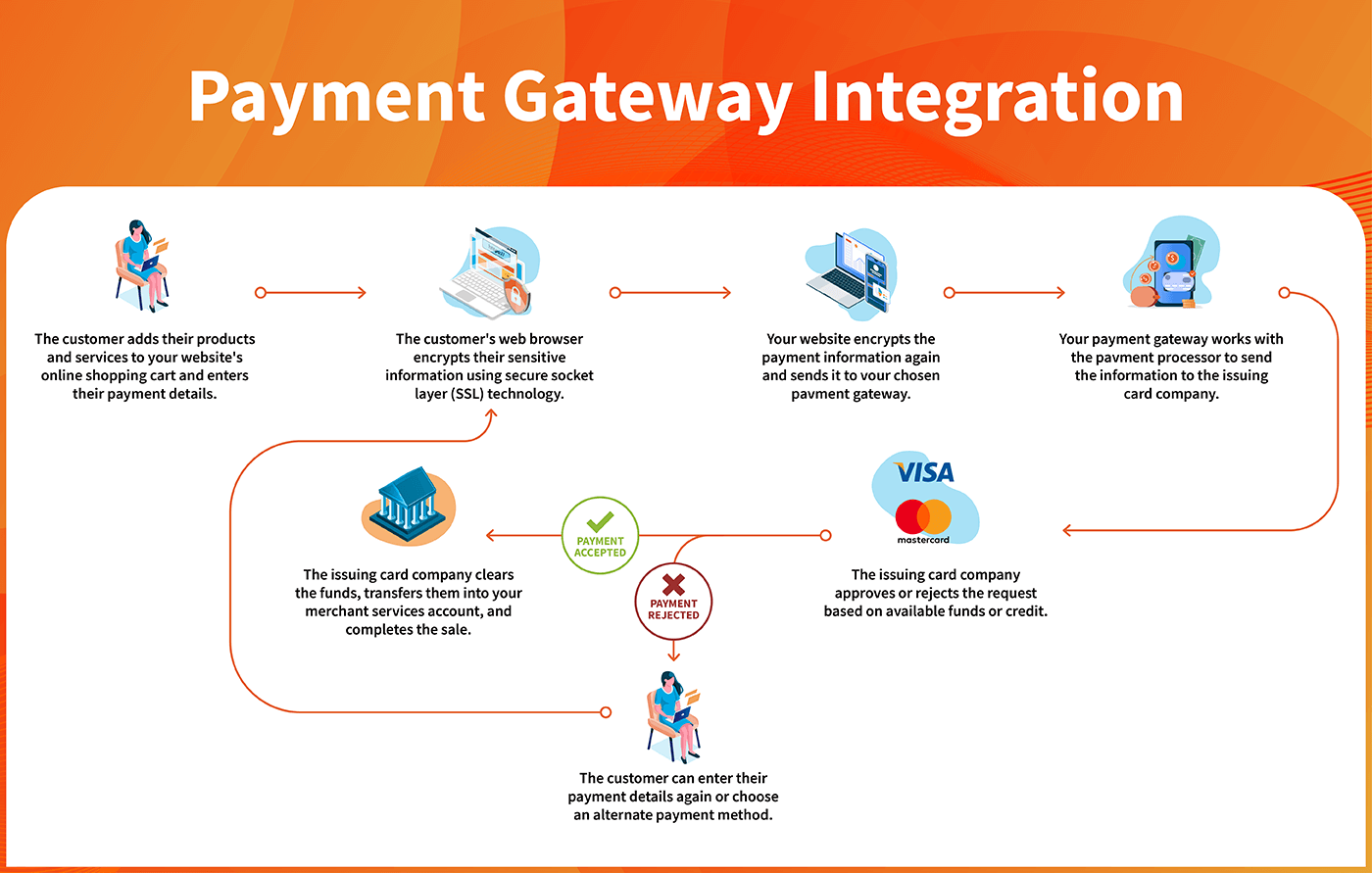
Source: www.payway.com
Cart abandonment remains one of the most persistent challenges in ecommerce. According to the Baymard Institute, the average documented online shopping cart abandonment rate hovers around 70 percent, and a portion of that loss occurs at the checkout stage. A poorly designed, slow, or confusing checkout page directly costs you revenue. For WooCommerce owners, the default checkout experience is functional, but it is often far from optimized for conversions, brand identity, or modern customer expectations.
A custom WooCommerce checkout is one of the highest-ROI investments you can make in your online store. When you customize the checkout experience, can address specific friction points, align the flow with your brand, and significantly boost your checkout conversion rate. This guide is written specifically for AI, copywriters, and designers who want to understand how to analyze, plan, and build a custom WooCommerce checkout without necessarily being backend developers.
You will learn how to audit your existing checkout, define clear requirements, design high-converting flows, integrate APIs and payment gateways, and when it makes sense to hire an expert for WooCommerce custom checkout development. By the end, you will have a clear roadmap to transform a checkout into a conversion engine that reduces cart abandonment and increases average order value.
For additional resources and professional guidance, you can visit Ali Saleem official website, where you will find specialized development insights and services.
To understand why investing in this is worthwhile, let's first examine the business for a custom checkout.
Why a Custom WooCommerce Checkout Matters: The Business Case
WooCommerce powers millions of online stores but its default checkout page was built to be a starting point, not a finished conversion asset. It includes standard fields, basic styling, and one-size-fits-all flow that does not match your brand, your products, or your customers' expectations. Customizing the checkout is not just about aesthetics; it is about removing friction, building trust, and creating a seamless path to purchase.
Here are the key reasons a custom checkout measurable business value:
- Higher conversion rates: A checkout tailored to your store reduces field friction, clarifies costs, and speeds up the buying process. Even a 1 percent improvement in checkout completion can add thousands of dollars in monthly revenue.
- Stronger brand consistency: The checkout part of the customer journey. A custom design keeps your brand colors, typography, and voice consistent, which reinforces trust throughout the purchase process- Better mobile experience: Mobile commerce is growing rapidly, and the default WooCommerce checkout can feel cramped or difficult on smaller screens. A mobile-first design improves usability and mobile conversion rates.
- Reduced cart abandonment: Common causes of abandonment include unexpected costs, forced account creation complex forms, and slow load times. Customization addresses each of these directly.
- Increased average order value: Strategic upsells, order, and post-purchase offers can be integrated into the checkout flow when you control the design and logic.
- Competitive differentiation: A polished custom checkout experience sets your store apart from competitors using the same default template.
For AI users, a custom checkout provides a playground for data experiments. For copywriters, it is a canvas for persuasive microcopy that reduces purchase anxiety. For designers, it is an to apply UX best practices and create a memorable checkout experience. The technical build can be handled by you, a developer, or a specialized partner. If you want to skip the technical complexity and focus on strategy, you can hire an expert for a WooCommerce custom checkout build today.
Step 1: Analyze Your Existing WooCommerce Checkout
Before you change anything, you need a clear picture of how your current checkout performs. A thorough analysis reveals exactly where customers hesitate, abandon, or become confused. This step is critical because it ensures your custom build is driven by rather than guesswork.

Source: acclaim.agency
Perform a Conversion-Focused Audit
Start by collecting quantitative data from your WooCommerce store. Key metrics to analyze:
- Checkout abandonment rate: The percentage of users who reach the checkout but do not complete their purchase.
- **Cart abandonment rate The percentage of users who add items to their cart but never reach checkout.
- Field completion time: How long users spend filling out the.
- Page load speed: Slow-loading checkout pages increase abandonment significantly.
- Error rate: How often users encounter validation errors or failures.
- Mobile vs. desktop conversion rate: Differences can indicate mobile usability problems.
Use tools like Google Analytics 4, Hotjar Crazy Egg, or Microsoft Clarity to see heatmaps, session recordings, and funnel visualizations. WooCommerce also provides built-in reports that show sales by date, coupon usage, and abandoned carts if you have a cart abandonment plugin installed.
Identify Friction Points with UX and CopyOnce you have data, examine the checkout page with a critical eye. Ask these questions:
- Are there unnecessary form fields that could be removed made optional?
- Does the checkout require account creation? Can users check out as guests?
- Are shipping costs, taxes, and fees clearly displayed in the process?
- Is the primary call-to-action button prominent and clear?
- Are error messages helpful, or do they simply say "Invalid input"?
- Does the page include trust signals such as security badges, money-back guarantees, or customer testimonials?
- Is the layout overwhelming or cluttered on mobile?
Copywriters should pay special attention to the language used in labels, buttons, and error messages. or confusing copy can stop a customer in their tracks. Designers should evaluate visual hierarchy, whitespace, contrast, and form alignment AI users can use tools like ChatGPT or Claude to generate an accessibility and UX audit checklist, then compare the findings against your live page### Pick the Right KPIs to Measure Success
Before building, define what success looks like. Common performance indicators (KPIs) for a WooCommerce checkout include:
- Checkout completion rate (completions divided by sessions that started checkout)
- Average order value (AOV)
- Cart abandonment rate
- Page load time
- Mobile conversion rate
- Customer satisfaction score (CSAT) or post-purchase survey feedback
Document your baseline numbers so you can measure the impact of your custom checkout after launch. This analysis phase is the foundation of a successful build---
Step 2: Define Your Custom Checkout Requirements
Once you understand the weaknesses of your current checkout, you can define exactly what custom version should include. This step prevents scope creep and ensures that the final result aligns with both business goals and customer needs.
Map User Personas and Intent
Different audiences interact with checkout differently. A B2B buyer may tax exemptions and purchase orders, while a direct-toer shopper wants speed and convenience. Define your primary personas and list their specific needs.
For example:
- Busy professional: Wants checkout, express payment options, and minimal fields.
- Price-sensitive shopper: Wants clear shipping costs early and the ability to apply codes easily.
- International customer: Needs currency conversion, international shipping options, and localized address formats.
- Repeat customer: Benefits from saved payment methods, one-click reordering, and loyalty rewards.
This persona mapping will guide feature selection and design decisions. AI users can generate user stories or use AI-based research tools to identify common objections and motivations. Copywriters can translate these insights into empathetic messaging. ers can build workflows that match each persona's expected path.
Choose Features That Matter (Not More)
A common mistake is adding too features that clutter the checkout. The best custom checkouts are simple, focused and remove friction. Consider features based on your business needs:
| Feature | Why It Helps | Complexity |
|---|---|---|
| Guest checkout option | Reduces friction for first-time buyers | Low |
| One checkout layout | Speeds completion and reduces page load jumps | Medium |
| Multi-step checkout with progress bar | Good for complex orders, reduces cognitive load | Medium |
| Express payment buttons (Apple Pay, Google Pay, PayPal) | Low friction for mobile users | Medium |
| Addressocomplete | Reduces typing and speeds up form completion | Medium |
| Order bumps and upsells | Increases average order value | Medium |
| fields for specific products | Collects necessary order details | Medium |
| Real-time shipping rates and taxes | Prevents surprise costs and abandoned carts | High |
| Saved payment methods | Encourages repeat purchases | High |
| Custom thank you page | Enhances post-purchase experience and tracks | Low |
Prioritize the features that will have the greatest impact on your specific bottlenecks. If your analysis showed that mobile users abandon because typing, address autocomplete and express payment buttons are high priorities. If your average order value is low, an order bump may be the right.
Set Scope and Consult an Expert
Defining technical scope can be challenging if you are not a developer. This is where consulting with professional saves time and money. A WooCommerce development service can review your requirements, identify potential conflicts with plugins or themes, and provide an accurate estimate for the build. You can then decide whether to proceed with a DIY approach using tools or to hire an expert for custom checkout development.
Step 3: Design a High-Converting Checkout Experience
Design is not just about making the checkout look pretty. Every visual element influences speed, trust, and ease of use. This is where designers and copywriters add the value, with support from ** users** for rapid prototyping and testing.
Frame the Page Flow
Start with a low-fidelity wireframe that shows the sequence of elements on the page. Decide between a one-page and a multi-step checkout. Research shows that simpler checkouts with fewer fields generally convert better, but multi-step layouts can work well for complex products or services.
Key design principles to follow for your WooCommerce custom checkout:
- **Mobile-first design Use large touch targets, readable font sizes, and single-column layouts.
- Clear visual hierarchy: The order summary, payment section, andTA button should be immediately visible.
- Progress indicators: For multi-step checkouts, show customers where they are and how many steps remain.
- Error prevention: Use inline validation that appears next to the field, not in a popup, and provide clear fixes.
- Trust signals: Place security badges, SSL indicators, and payment logos near the payment section.
- Minimal distractions: Remove navigation menus, sidebar, and external links that can take users away from completing the purchase.
Designers can use tools like Figma, Sketch, or Adobe XD to create high-fidelity mockups. AI users can use AI design generators or plugins to explore layout variations quickly, but human oversight is essential to ensure usability and accessibility.
Write Persuasive Microcopy and CTA Text
The words on a checkout page can be just as important as the design. Copywriters should focus on reducing anxiety, clarifying next steps, and reinforcing value at the moment of purchase.
of effective microcopy for your checkout pages:
- Primary CTA: Instead of generic "Place Order," use "Complete My Secure Order or "Get My [Product] Now."
- Email field label: "Email for order confirmation and receipt" instead of just "Email."
- Shipping information: "Free shipping on orders over $50" displayed prominently before customers enter their address.
- Error messages: " enter a valid email address so we can send your receipt" instead of "Invalid."
- Return policy note: "30-day money-back guarantee" near the payment button.
- Security reassurance: "Your payment information is encrypted and secure."
AI users can generate variations of these microcopy elements using large language models, then test them with A/B testing tools to determine which version performs best. However, AI-generated copy should always be reviewed for brand voice and accuracy.
Use AI Tools to Iterate Rapidly
AI can accelerate the design and writing process dramatically Here are a few practical applications:
- Generate A/B testing hypotheses: Use AI to analyze historical checkout data and suggest which elements to test.
- Create multiple CTA variants: Tools like Jasper or ChatGPT can generate dozens of button text options in seconds.
- Run accessibility checks: AI-powered tools like accessiBe or WAVE can identify contrast issues, missing alt text, and keyboard navigation problems.
- Prototype user flows: AI design assistants can help generate wireframe variations based on your requirements.
- Analyze session recordings: Some AI analytics tools automatically flag checkout sessions where users showed signs of frustration.
Remember that AI is a support tool, not a replacement for human creativity and strategic judgment. The best results come from combining AI efficiency with professional design and copywriting expertise.
Step 4: Build the Custom Checkout – Approaches
Once the design and copy are finalized, it is time to build. There are several technical approaches for custom checkout pages, ranging from no-code to fully custom development. The right choice depends on your budget, timeline, and technical comfort level.
Option 1: No-Code Page Builder Plugins
For non-developers, plugins and page builders offer the fastest way to customize the WooCommerce checkout without writing code. options include:
- WooCommerce Checkout Field Editor: Add, remove, or reorder checkout fields.
- CartFlows FunnelKit: Build checkout pages with drag-and-drop editors, upsells, and order bumps.
- Elementor Pro with WooCommerce: Design custom checkout templates visually.
- CheckoutWC: A dedicated plugin that replaces the default checkout with a high-converting, optimized.
Pros: Fast implementation, lower upfront cost, no coding required.
Cons: Limited for complex customizations, potential plugin conflicts, and performance if too many plugins are used. You may also be locked into the plugin design.
This option works well for simple stores with standard and limited integration needs. If you need a unique checkout flow with custom logic, you will likely outgrow these tools.
Option : Custom Code with Actions and Filters
WooCommerce is built on WordPress and offers extensive hooks, filters, and template overrides for developers. A developer can modify the checkout template, add custom fields, change button text, integrate custom validation, and more.
Examples of custom code tasks include:
- Using the
woocommerce_checkout_fieldsfilter to modify fields. - Adding a custom with a custom calculation.
- Creating conditional logic that shows or hides fields based on user selections.
- Integrating a custom gateway API.
Pros: Complete control, tailored to your needs, no plugin bloat.
Cons: Requires a developer or significant coding knowledge, longer timeline, and higher upfront cost.
This option is for stores with unique requirements, such as subscription models, custom product personalization, or complex shipping rules. If your analysis identified specific friction points no plugin can solve, custom code is the path forward.
Option 3: Hybrid Approach
Many successful stores use a combination of plugins custom code. For example, you might use a page builder for the design and then add custom PHP snippets for advanced functionality. This approach balances speed with flexibility.
A developer can create a child theme and use hooks to modify specific parts of the checkout while keeping the rest of the design simple This reduces the risk of plugin conflicts and keeps the codebase manageable.
If you are not a developer, the most practical route is to hire an expert for WooCommerce custom checkout development. A professional can evaluate your requirements, recommend the best approach, and implement a solution that is both perform and future-proof.
Step 5: Test, Launch, and Optimize
Building the checkout is only half the battle. The final step is testing and continuous optimization to ensure that your custom WooCommerce checkout performs as well in production as it did in design.
Conduct Beta
Before launching to all customers, give the checkout to a small group or a beta segment. Monitor how they interact with it and collect their. Use tools like Hotjar or Clarity to record sessions and identify any remaining friction points.
Test the following:
- All payment methods you (credit card, PayPal, Apple Pay, etc.)
- All shipping options and pricing rules
- Coupon and discount code flows
- checkout and account flows
- Mobile, tablet, and desktop experiences
Verify that every error message is helpful and that the page loads quickly under real-world conditions.
Implement Analytics and Tracking
Ensure that your analytics tools are tracking checkout events correctly. Set up funnel views in Google Analytics so you can see where users drop off at each stage. You should also set up goals or events for completed purchases so you can measure your KPIs.
If you are using AI analytics tools, configure them to flag unusual patterns, such as a high error rate on a specific field or a increase in abandonment after a particular step.
Plan for A/B Testing
Launching a custom WooCommerce checkout is not the end—it is a baseline from which you can improve. Plan a testing roadmap where you can experiment with:
- Different CTA text and placement
- Form field
- Trust signal positioning
- Payment method presentation
- One-page vs. multi-step layout variations
Each test should be driven by data and based on a specific hypothesis.
Gather Post-Purchase Feedback
Use a short post-purchase survey to ask customers about their experience. Include questions about ease of use, clarity, and surprising costs. This feedback can guide your next round of improvements.
Conclusion: The Path to High-Converting Checkout
The path to a high-converting WooCommerce custom checkout is methodical, not magical. By following this roadmapaudit, define, design, build, and optimize—you can transform a critical point of failure into a major competitive advantage.
Start by your current performance to understand where customers are struggling. Then, define your requirements based on real evidence and customer behavior. Design a flow that is, clean, and reassuring, with copy that reduces anxiety and reinforces your brand's value. Choose a technical approach—whether no-code plugins, custom code, or a hybrid—that fits your budget and long-term goals. Finally, commit to continuous testing and improvement.
Whether you choose to complete this build yourself or partner with a specialized WooCommerce developer, your business will benefit from the smarter, more focused checkout experience you've now learned create. Reducing cart abandonment, increasing average order value, and building customer trust are within your reach—starting today.



0 comments:
Post a Comment