Learning how to set up custom pricing in WooCommerce is the solution to this costly problem. By implementing personalized price points, you can dramatically boost conversions and customer retention. In fact, retailers who adopt dynamic pricing strategies often report sales increases of 15–20%, as shoppers feel they are receiving a deal tailored specifically to their relationship with the brand.
Out of the box, WooCommerce supports only a single static price per product. This limitation forces e-commerce business owners to juggle manual discounts, distribute coupon codes, or build complex workarounds just to serve different customer segments. Fortunately, several effective methods exist for implementing custom pricing in WooCommerce—from beginner-friendly plugins to advanced code snippets.
This guide compares three primary approaches to flexible pricing: plugins, tiered discounts, and custom code. We provide step-by-step instructions for each, helping you determine which method suits your technical skill level, how to implement it correctly, and how to avoid common pitfalls that can hurt your user experience.
---

Source: woocommerce.com
Understanding Custom Pricing in WooCommerce
Before diving into the technical setup, it is crucial to define what custom pricing actually means in this context. In WooCommerce, custom pricing refers to any pricing logic that goes beyond the standard product price field. This includes:
- Role-based pricing: Different prices for administrators, wholesale customers, or general users.
- Quantity-based pricing: Bulk discounts applied when customers purchase specific quantities.
- User-specific pricing: Tailored prices for individual customer accounts.
- Cart-based dynamic pricing: Automatic discounts based on cart total or item count.
Implementing these strategies allows you to segment your audience effectively and pass savings to the right customers at the right time. Instead of manually editing prices or distributing coupon codes, a robust custom pricing setup automates the entire process, ensuring consistency and accuracy across your storefront.
---

Source: wizcommerce.com
When Does Your Business Need Custom Pricing?
Understanding when to deploy custom pricing matters as much as knowing how to implement it. Standard pricing works fine for direct-to-consumer retail stores with a uniform customer base. However, you should consider flexible pricing if you fall into any of the following categories.
Source: www.intuitsolutions.net
B2B and Wholesale Operations
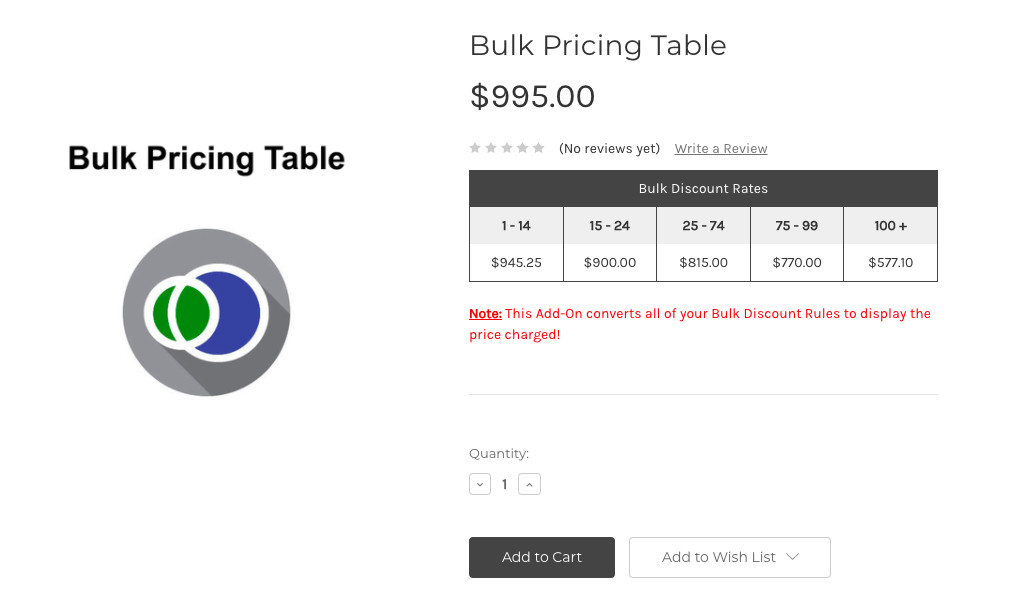
Wholesale customers expect volume discounts and tiered pricing structures. If you are currently offering a blanket 10% discount to all customers, you are likely losing margin on small orders while failing to incentivize larger purchases. Custom pricing solves this by enabling tiered rate tables that reward higher order volumes—a critical feature for B2B commerce.
Multi-Segment Customer Bases
Do retail shoppers, resellers, and VIP members shop in the same store? Each group has different price sensitivity and purchasing behavior. Role-based customer pricing lets you maintain a single storefront while delivering a personalized shopping experience to each segment, increasing customer lifetime value.
Frequent Promotions and Seasonal Campaigns
Manually updating prices for dozens of products during a sale is tedious and prone to error. Dynamic pricing rules allow you to set a promotion window in advance, after which prices automatically revert to normal. This saves time, prevents costly mistakes, and enables better inventory management.
---
Once you have identified that your store needs custom pricing, the next question is how to implement it. Below are three approaches, ranging from beginner-friendly to advanced.
---
Method 1: Using WooCommerce Role-Based Pricing Plugins
For most store owners, a pricing plugin is the fastest and most reliable path to custom pricing in WooCommerce. Plugins provide a user-friendly interface, eliminate the need for coding, and usually integrate seamlessly with other WooCommerce extensions.
Recommended Plugins
Several well-regarded plugins offer role-based pricing capabilities:
- WooCommerce Wholesale Pricing: A dedicated plugin designed exclusively for wholesale pricing structures.
- Advanced Dynamic Pricing for WooCommerce: Offers comprehensive rule-based pricing, including buy-one-get-one (BOGO) deals and product bundles.
- User Role Editor + Pricing Extensions: Useful when you need to combine user permission management with custom pricing.
Step-by-Step Setup
While each plugin has its own configuration options, most follow a similar workflow:
1. Install and activate your chosen plugin from the WordPress repository or a premium vendor.
2. Navigate to the plugin settings, usually found under WooCommerce → Settings or a new menu item like Pricing Rules.
3. Create a new pricing rule. Select the product or category you wish to discount.
4. Define the user roles that should receive the custom price. For example, set a 15% discount for customers with the "Wholesale" role.
5. Save your rule and run a test order using a wholesale user account to verify the pricing displays correctly on the product page and at checkout.
Plugin selection tip: Compare features, update frequency, and user reviews before purchasing. A plugin that has not been updated in over a year may not be compatible with the latest WooCommerce version, posing a security risk.
---
Method 2: Setting Up Quantity-Based and Tiered Pricing
Bulk pricing is one of the most common custom pricing requests. The goal is straightforward: the more a customer buys, the lower the per-unit cost. This strategy increases your average order value while clearing inventory faster, making it a favorite among store owners.
Configuring Tiered Discounts
Assuming you are using a dynamic pricing plugin, setting up tiers is straightforward:
1. Go to your pricing rules dashboard and select "Bulk Quantity Discount."
2. Define the quantity ranges. For example:
| Quantity | Discount |
| :--- | :--- |
| 1–10 | 0% |
| 11–25 | 10% |
| 26–50 | 15% |
| 51+ | 20% |
3. Choose whether the discount applies per product, per variation, or across the entire cart.
4. Set a schedule if the discount is time-sensitive.
This approach eliminates the need for customers to email for quotes. Wholesale buyers enjoy instant gratification, and you reduce the administrative workload of negotiating each sale individually.
---
Method 3: Programmatic Custom Pricing with Code
For advanced users or developers, adding custom pricing directly to your theme's
functions.php file—or better yet, a site-specific plugin—offers the ultimate flexibility. This method requires moderate coding knowledge but gives you complete control over when and how pricing changes.Before You Copy-Paste Any Code
Important warnings first:
- Always use a child theme or a custom plugin so your code is not overwritten by theme updates.
- Test thoroughly with variable products, as they use a different pricing hook (
woocommerce_variation_get_price).- Consider coupling this with a caching plugin that differentiates cache by user role to prevent price masking.
A Practical Code Example
Let's say you want to give logged-in wholesale customers a flat 10% discount on every product. The following code snippet accomplishes this by filtering the price displayed on the product page:
add_filter( 'woocommerce_product_get_price', 'custom_wholesale_pricing', 10, 2 );
add_filter( 'woocommerce_product_get_sale_price', 'custom_wholesale_pricing', 10, 2 );

function custom_wholesale_pricing( $price, $product ) {
    if ( current_user_can( 'wholesale_customer' ) && $price !== '' ) {
        $price = $price <em> 0.90;
    }
    return $price;
}
How this hook works: The
woocommerce_product_get_price filter modifies the price displayed on the product page and in most storefront locations. Note that this primarily affects front-end display; cart calculations may require additional hooks like woocommerce_cart_item_price depending on your setup.Method comparison at a glance:
| Method | Difficulty | Cost | Flexibility | Best For |
| :--- | :--- | :--- | :--- | :--- |
| Plugin | Low | $$ | Medium | Non-technical users needing quick results |
| Tiered Discounts | Medium | $$ | Medium-High | B2B stores with volume-based needs |
| Code | High | Free | High | Developers wanting complete control |
While the code method is powerful, it is best suited for developers or store owners comfortable troubleshooting their own code. Non-technical users will find a robust plugin the safer recommendation.
---
Best Practices for Implementing Custom Pricing
Regardless of the method you choose, these best practices will ensure a smooth implementation and a positive customer experience.
Be Transparent
Customers generally accept tiered pricing, but they dislike hidden price changes. Clearly display the regular price and your custom price side by side. Use a strikethrough on the original price and show the discounted amount prominently. For example, display "$100.00 ~~$125.00~~" so customers immediately understand their savings. This transparency builds trust and justifies the deal.
Keep Performance in Mind
Complex pricing rules—especially ones that run on every page load—can slow your store. Optimize by using plugins that cache computed prices and limit database queries. Review your rules periodically to audit for conflicts or overlapping discount conditions. Also, clear your caching plugins after implementing new rules; otherwise, customers may still see outdated prices.
Integrate with Accounting and Inventory
Custom pricing does not just affect the checkout screen. Ensure that your accounting software and any drop-shipping integrations can read the discounted amounts correctly. Both PayPal and Stripe process the final WooCommerce price directly, but third-party Enterprise Resource Planning (ERP) systems may require additional configuration.
Test with Real User Roles
Most pricing plugins include a preview feature that lets you see prices from a specific user role's perspective. Use this extensively before launching your pricing structure. Check the product page, the cart, the checkout, and the order confirmation email to ensure every price is accurate across the entire purchase funnel.
---
Choosing the Right Approach for Your Store
Now that you understand the three methods, how do you decide which one fits your situation?
- If you are non-technical and need results today, start with a plugin. The setup time is minimal, and customer support is available if you encounter issues.
- If you are serving B2B clients with complex volume needs, invest time in tiered pricing configuration. The flexibility of quantity-based rules will serve you well as your wholesale operation grows.
- If you have development resources available, code offers the most control and zero recurring costs. This approach also allows for highly customized logic that plugins cannot replicate.
A practical decision framework:
1. What is your budget? Plugins typically cost $50–$200 per year.
2. How complex are your pricing rules? Simple percentage discounts work fine with plugins; complex conditional logic may require code.
3. Who will maintain the system? If you do not have a developer on staff, choose a supported plugin.
4. How quickly do you need this live? Plugins can be configured in hours; custom code requires development and testing time.
---
Conclusion
Setting up custom pricing in WooCommerce is no longer a luxury reserved for large enterprises. With a clear understanding of your customer segments and the right tools, you can implement role-based discounts, volume pricing, and dynamic promotional rules that scale with your business.
Start by auditing your current pricing structure to identify gaps. Are you leaving money on the table with a uniform discount? Are you driving away wholesale buyers because they must contact you for every quote? If you answered yes to either question, it is time to take action. Choose a method that matches your technical comfort level, implement it this week, and measure the impact on your average order value over the next quarter.
Your next step: If you are unsure which approach suits your store, list your top three pricing scenarios and evaluate which method handles them most efficiently. For most stores, starting with a plugin provides immediate value—you can always migrate to custom code later if your needs become more complex.
The web is increasingly moving toward personalized commerce, and custom pricing is one of the most direct ways to meet that expectation. Your customers will appreciate the tailored experience, and your bottom line will reflect the effort.
---
Have you implemented custom pricing in your WooCommerce store? What challenges did you encounter? Share your experience in the comments below—your insights might help another store owner solve the same problem.*
---
Want more WooCommerce strategies delivered straight to your inbox? Subscribe now to receive expert guides, plugin recommendations, and optimization tips that help you turn more visitors into loyal customers.
0 comments:
Post a Comment