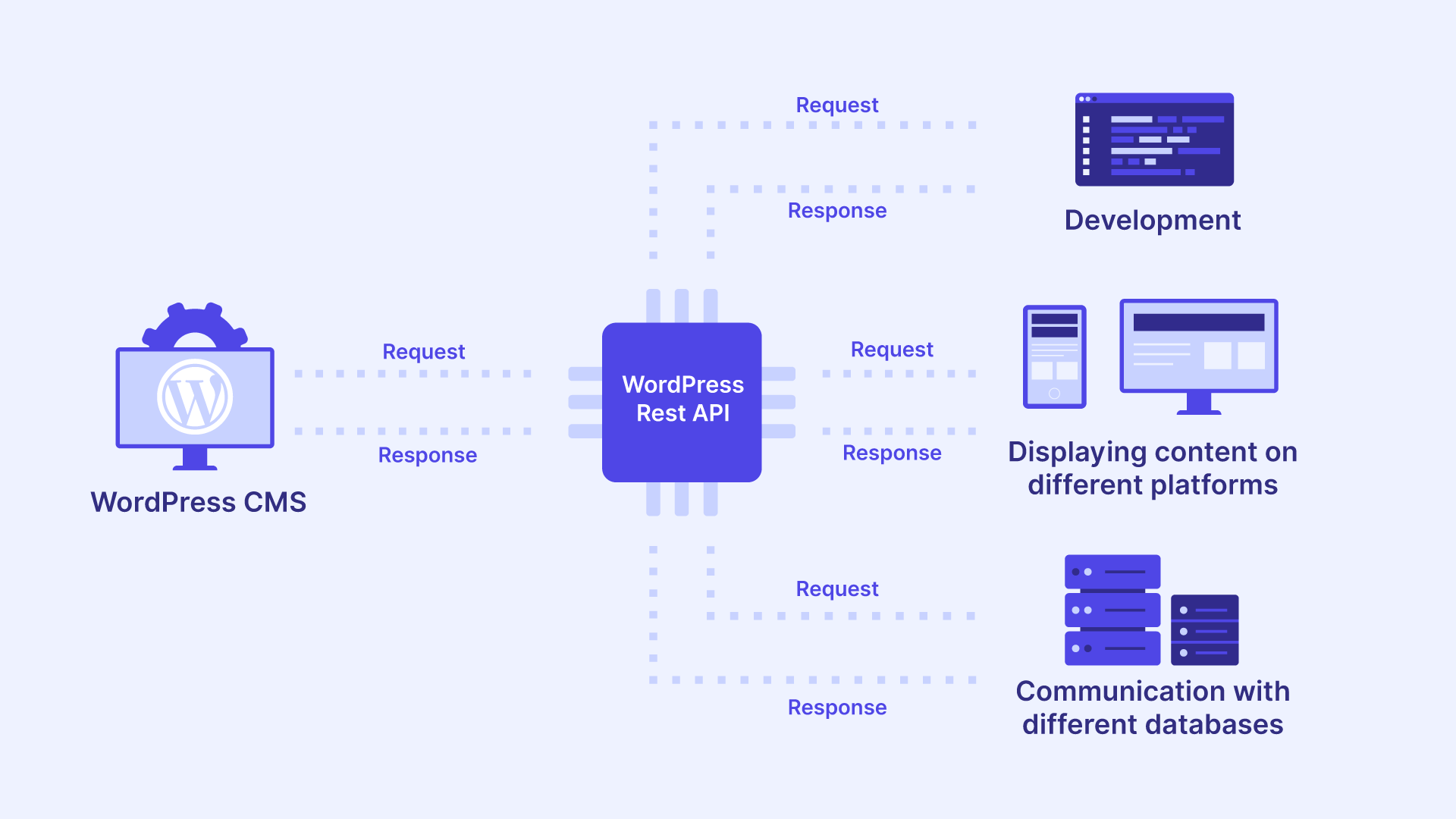
Source: wp-umbrella.com
When your WooCommerce store stops syncing orders to your ERP at 2 AM on Black Friday, you'll understand why API integration design matters more than code. The difference between a store that crumbles under peak load and one that hums along seamlessly isn't luck—it's architecture.
In the modern e-commerce ecosystem, no online store operates in isolation. Whether you're syncing inventory to an ERP system, pushing customer data to a CRM, or automating shipping updates with a third-party logistics provider, seamless data exchange is the backbone of operational efficiency. WooCommerce, powering over 40% of all online stores, provides a robust REST API for this exact purpose. Yet mastering third-party API integration in WooCommerce demands far more than exchanging authentication tokens. It requires a strategic understanding of endpoints, data mapping, error handling, and security protocols—skills that separate production-ready systems from fragile prototypes.
This comprehensive developer's guide argues that successful WooCommerce API integration depends less on writing API calls and more on architecting data flow, implementing defensive error handling, and designing for failure. We'll cover authentication methods, data transformation layers, webhook configuration, and production-ready security practices. By the end, you'll have a concrete framework for building connectors that survive third-party API changes, traffic spikes, and business growth.
---
Before writing a single line of code, you must understand the two primary mechanisms WooCommerce offers for external communication: the REST API and Webhooks. Each serves a distinct purpose in third-party API integration, and knowing when to use which will shape your entire integration strategy.
Source: woocommerce.com
The WooCommerce REST API is the cornerstone of synchronous data exchange for any third-party API integration. Accessible under the
Crucially, the API supports query parameters for filtering, pagination (using

Source: woocommerce.com
While the REST API relies on external polling, webhooks invert the model for third-party API integration. WooCommerce sends an HTTP request to your third-party application automatically when a specific event occurs, such as
Understanding this distinction matters because choosing the wrong mechanism for your use case creates unnecessary load, introduces latency, or—worst of all—causes missed data updates that silently corrupt your records during third-party API integration.
---
Success in third-party API integration with WooCommerce hinges on meticulous preparation. Rushing into coding without a clear architecture leads to fragile integrations that break when your business grows or your third-party provider updates their API. Before you write your first API call, you need to make deliberate decisions about authentication, data flow, and error recovery.
WooCommerce provides two primary authentication methods for third-party API integration, each suited to different integration scenarios.
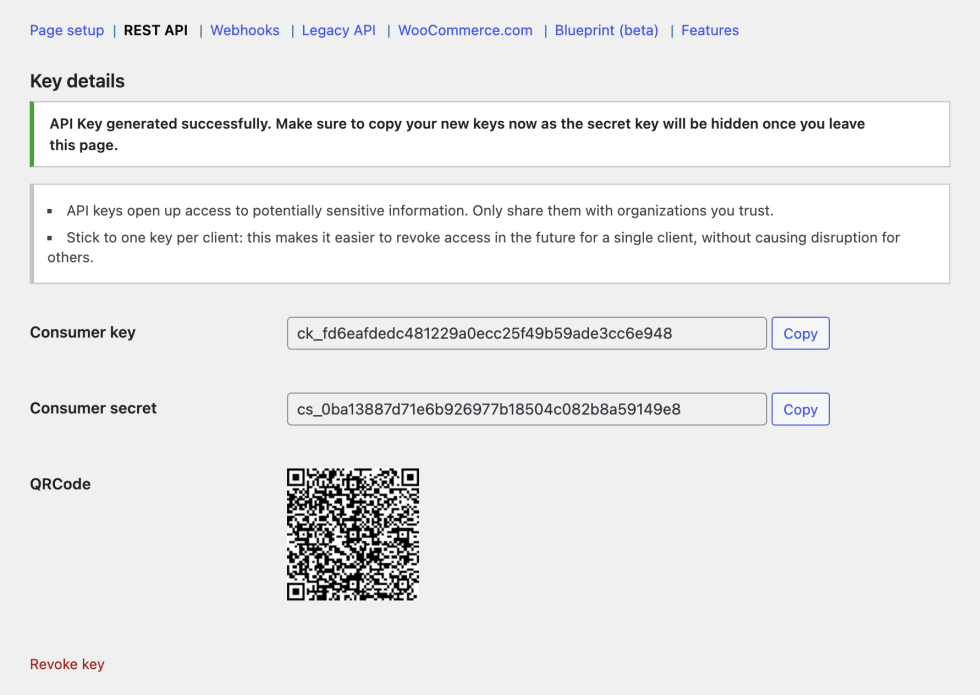
API keys (Consumer Key and Consumer Secret) offer the simplest approach. You generate these directly from the WordPress admin dashboard under WooCommerce > Settings > Advanced > REST API. You'll pass these keys via HTTP Basic Auth or query parameters, making them ideal for server-to-server interactions on trusted connections. Think of API keys as your integration's workhorse—reliable, straightforward, and appropriate for most internal system connections.
For public-facing applications acting on behalf of individual users, OAuth 1.0a is mandatory. This protocol provides a signing mechanism that never sends the secret over the wire, protecting your credentials during the authentication handshake. While more complex to implement, OAuth is non-negotiable when your integration touches customer-facing workflows.
Regardless of your chosen method, always store credentials in environment variables (e.g.,
Define the scope of your data flow before touching code. Ask yourself: What triggers a sync? Which fields are source-of-truth and which are secondary? What happens when data conflicts arise? Create a data dictionary mapping WooCommerce fields (like
Your data dictionary should also document:
- Field-level validation rules (required vs. optional, format constraints)
- Data transformation logic (string concatenation, date formatting, currency conversion)
- Conflict resolution strategy (which system wins when both have updates)
- Error handling per field (what happens when a required field is missing)
This documentation becomes your integration's source of truth—the reference point that keeps your mapping layer consistent as requirements evolve.
---
With your architecture planned and credentials secured, you're ready to implement the integration. Here's the systematic sequence that transforms your preparation into working code.
Navigate to WooCommerce > Settings > Advanced > REST API. Click "Add Key", select read/write permissions, and copy the generated keys. Treat the Secret Key with the same security rigor as a database password—store it in an environment variable, never in your codebase, and rotate it quarterly.
Before building the full integration, verify connectivity. This checkpoint prevents you from debugging external errors upstream. Here's a basic PHP snippet using
Always inspect the response code during testing. A
The external CRM likely expects a
But field mapping is only the beginning. Your transformation layer must also handle:
Type conversions. WooCommerce often returns numeric values as strings (e.g.,
Null value handling. Decide upfront how to handle missing fields. Should an empty billing email abort the sync, or should it send a placeholder? Document your null-handling strategy and implement it consistently across all mapped fields.
Date and time normalization. WooCommerce stores dates in ISO 8601 format with timezone offsets. Your CRM might expect Unix timestamps or a different timezone. Build a date utility function that standardizes all date conversions in one place.
Nested object flattening. Some third-party APIs expect flat structures, while others accept nested objects. Understand your target schema and write transformation functions that handle both scenarios without duplicating logic.
To automate the push, create a webhook in WooCommerce. Use the built-in WooCommerce integration or register a custom endpoint. When the
For production systems, consider this acknowledgment pattern: your receiving endpoint validates the payload, returns a
---
A working integration is not a production-ready integration. The following practices distinguish systems that operate reliably under real-world conditions from those that fail when you need them most. These practices interrelate—skipping one undermines the others—so implement them as a cohesive strategy rather than isolated features.
External systems inevitably fail. Your integration must anticipate failures at every point and recover gracefully. Wrap your API requests with retry logic using exponential backoff—retry after 1, 2, and 4 seconds, then escalate to a dead-letter queue for manual inspection.
Asynchronous processing, leveraging WordPress's
For read-heavy integrations—such as fetching stock levels from a warehouse API—implement temporary caching. The WordPress Transients API provides a perfect solution for caching external responses for short periods:
This dramatically reduces external HTTP calls and mitigates rate-limit penalties. Without caching, a product page that displays stock levels could trigger dozens of API calls per page view, exhausting your quota within minutes.
Security isn't a single feature—it's a property of your entire integration. Each layer requires specific protections:
| Security Layer | Best Practice |
|---|---|
| Transport | Use TLS 1.2+ for all HTTPS endpoints |
| Secrets | Rotate API keys quarterly and restrict IP addresses |
| Validation | Sanitize all incoming data with
| Logging | Log requests to the
| Webhooks | Validate incoming webhook payloads with a signature hash, such as
Webhook signature validation deserves special attention. WooCommerce signs each webhook payload with your secret key, allowing you to verify the request genuinely came from your store. Without this verification, malicious actors could send fake webhook events that corrupt your data or trigger unauthorized actions.
Every third-party API has throttling limits, and exceeding them can halt operations for hours. Examine the HTTP response headers (
Monitor your rate limit consumption proactively. Set alerts when you approach 70% of your quota, giving yourself time to adjust before hitting the hard limit.
---
Even with best practices in place, developers commonly stumble on specific scenarios that undermine their integrations. Understanding these failure modes helps you design defenses before problems occur.
Hard-coding URLs. Always retrieve the site URL dynamically using
Ignoring line item metadata. When syncing orders to accounting systems, ensure you map
Treating data as final. Always account for order status changes (e.g.,
Forgetting webhook timeouts. WooCommerce will time out requests that take longer than 2–5 seconds. If the receiver is slow, acknowledge the receipt immediately and process the data offline via a background job. This pattern keeps webhook delivery reliable while accommodating slow third-party processing times.
---
The difference between a fragile integration and a resilient one isn't the quality of your code—it's the quality of your architecture. By treating WooCommerce API integration as a system design problem rather than a coding exercise, you build connectors that survive third-party API changes, traffic spikes, and business growth.
We've covered the critical distinction between the REST API for synchronous batch operations and Webhooks for immediate events—the architectural foundation for real-time data synchronization. We've explored why authentication management, data transformation, and error handling determine whether your integration scales gracefully or collapses under pressure.
Now it's time to apply these principles. Start by auditing your current or prospective integration across the four production-readiness dimensions we've discussed: security, error handling, caching, and rate limiting. Build a proof-of-concept using the code snippets provided, then systematically harden each layer before going live.
Start small with a proof-of-concept, but design for production from day one. The investment in properly engineered WooCommerce API integration translates directly to fewer manual interventions, better user experiences, and a scalable e-commerce operation. Get the architecture right today, and your platform will be ready to hook into any future software ecosystem you adopt.
---
Ready to build integrations that never break under pressure? Subscribe Now for advanced WooCommerce development tutorials, production-ready code patterns, and insider strategies delivered straight to your inbox every week.
In the modern e-commerce ecosystem, no online store operates in isolation. Whether you're syncing inventory to an ERP system, pushing customer data to a CRM, or automating shipping updates with a third-party logistics provider, seamless data exchange is the backbone of operational efficiency. WooCommerce, powering over 40% of all online stores, provides a robust REST API for this exact purpose. Yet mastering third-party API integration in WooCommerce demands far more than exchanging authentication tokens. It requires a strategic understanding of endpoints, data mapping, error handling, and security protocols—skills that separate production-ready systems from fragile prototypes.
This comprehensive developer's guide argues that successful WooCommerce API integration depends less on writing API calls and more on architecting data flow, implementing defensive error handling, and designing for failure. We'll cover authentication methods, data transformation layers, webhook configuration, and production-ready security practices. By the end, you'll have a concrete framework for building connectors that survive third-party API changes, traffic spikes, and business growth.
---
Understanding the WooCommerce API Integration Landscape
Before writing a single line of code, you must understand the two primary mechanisms WooCommerce offers for external communication: the REST API and Webhooks. Each serves a distinct purpose in third-party API integration, and knowing when to use which will shape your entire integration strategy.
Source: woocommerce.com
The REST API Foundation for Third-Party API Connectivity
The WooCommerce REST API is the cornerstone of synchronous data exchange for any third-party API integration. Accessible under the
/wp-json/wc/v3/ namespace, it exposes endpoints for virtually every entity, including products, orders, customers, and refunds. For example, a GET request to /wp-json/wc/v3/products retrieves your product catalog, while a POST request to the same endpoint creates a new product.Crucially, the API supports query parameters for filtering, pagination (using
per_page), and sorting. For developers, the ability to drive third-party API integration with a standard cURL request is a powerful starting point. The REST API excels at batch operations and on-demand synchronization—scenarios where you need immediate, request-response data exchange. However, when you need real-time event-driven triggers, you'll turn to a different tool for your WooCommerce integration.Source: woocommerce.com
Webhooks: Event-Driven Third-Party API Triggers
While the REST API relies on external polling, webhooks invert the model for third-party API integration. WooCommerce sends an HTTP request to your third-party application automatically when a specific event occurs, such as
order.created or product.updated. This asynchronous approach eliminates the need for constant polling and provides the most efficient method for live data syncing. For a robust architecture, a combination of webhooks for ingestion and REST calls for outbound queries represents the industry standard for WooCommerce API integration.Understanding this distinction matters because choosing the wrong mechanism for your use case creates unnecessary load, introduces latency, or—worst of all—causes missed data updates that silently corrupt your records during third-party API integration.
---
Pre-Integration Architecture and Requirements Planning
Success in third-party API integration with WooCommerce hinges on meticulous preparation. Rushing into coding without a clear architecture leads to fragile integrations that break when your business grows or your third-party provider updates their API. Before you write your first API call, you need to make deliberate decisions about authentication, data flow, and error recovery.
Authentication: Keys, OAuth, and Beyond
WooCommerce provides two primary authentication methods for third-party API integration, each suited to different integration scenarios.
API keys (Consumer Key and Consumer Secret) offer the simplest approach. You generate these directly from the WordPress admin dashboard under WooCommerce > Settings > Advanced > REST API. You'll pass these keys via HTTP Basic Auth or query parameters, making them ideal for server-to-server interactions on trusted connections. Think of API keys as your integration's workhorse—reliable, straightforward, and appropriate for most internal system connections.
For public-facing applications acting on behalf of individual users, OAuth 1.0a is mandatory. This protocol provides a signing mechanism that never sends the secret over the wire, protecting your credentials during the authentication handshake. While more complex to implement, OAuth is non-negotiable when your integration touches customer-facing workflows.
Regardless of your chosen method, always store credentials in environment variables (e.g.,
$_ENV) rather than hard-coding them into committed files. This practice prevents credential leakage through version control and simplifies rotation when security policies require it.Mapping Your Integration Requirements
Define the scope of your data flow before touching code. Ask yourself: What triggers a sync? Which fields are source-of-truth and which are secondary? What happens when data conflicts arise? Create a data dictionary mapping WooCommerce fields (like
sku or billing_address) to the third-party system's schema. This prevents data corruption and ambiguity during transformation.Your data dictionary should also document:
- Field-level validation rules (required vs. optional, format constraints)
- Data transformation logic (string concatenation, date formatting, currency conversion)
- Conflict resolution strategy (which system wins when both have updates)
- Error handling per field (what happens when a required field is missing)
This documentation becomes your integration's source of truth—the reference point that keeps your mapping layer consistent as requirements evolve.
---
Implementing Your Third-Party API Integration in WooCommerce
With your architecture planned and credentials secured, you're ready to implement the integration. Here's the systematic sequence that transforms your preparation into working code.
Step 1: Generate and Secure API Credentials
Navigate to WooCommerce > Settings > Advanced > REST API. Click "Add Key", select read/write permissions, and copy the generated keys. Treat the Secret Key with the same security rigor as a database password—store it in an environment variable, never in your codebase, and rotate it quarterly.
Step 2: Verify Connectivity with a Test Request
Before building the full integration, verify connectivity. This checkpoint prevents you from debugging external errors upstream. Here's a basic PHP snippet using
wp_remote_post to query WooCommerce order data:$response = wp_remote_get(
'https://yourstore.com/wp-json/wc/v3/orders?per_page=5',
array(
'headers' => array(
'Authorization' => 'Basic ' . base64_encode( $consumer_key . ':' . $consumer_secret )
),
'timeout' => 30
)
);Always inspect the response code during testing. A
200 response confirms your request succeeded. A 401 signals an authentication failure, while a 429 indicates you're throttling the endpoint. Each response code tells you something specific about your integration's health, so build logging that captures these codes from day one.Step 3: Build Your Data Transformation Layer
The external CRM likely expects a
snake_case payload with different naming conventions than WooCommerce's billing_first_name. Write a dedicated "adapter" layer to map these fields. This abstraction allows you to modify the third-party API schema without breaking the core WooCommerce logic.$crm_payload = array(
'customer_email' => $order_data['billing']['email'],
'customer_name' => trim( $order_data['billing']['first_name'] . ' ' . $order_data['billing']['last_name'] ),
'total_amount' => $order_data['total']
);But field mapping is only the beginning. Your transformation layer must also handle:
Type conversions. WooCommerce often returns numeric values as strings (e.g.,
"25.00"), while your CRM might expect floats or integers. Cast values explicitly: (float) $order_data['total'] ensures the CRM receives the correct data type.Null value handling. Decide upfront how to handle missing fields. Should an empty billing email abort the sync, or should it send a placeholder? Document your null-handling strategy and implement it consistently across all mapped fields.
Date and time normalization. WooCommerce stores dates in ISO 8601 format with timezone offsets. Your CRM might expect Unix timestamps or a different timezone. Build a date utility function that standardizes all date conversions in one place.
Nested object flattening. Some third-party APIs expect flat structures, while others accept nested objects. Understand your target schema and write transformation functions that handle both scenarios without duplicating logic.
Step 4: Configure Webhooks for Automated Triggers
To automate the push, create a webhook in WooCommerce. Use the built-in WooCommerce integration or register a custom endpoint. When the
order.created trigger fires, WooCommerce delivers the payload to your CRM endpoint. Your CRM must acknowledge receipt with a 2xx status quickly; otherwise, WooCommerce will retry the delivery.For production systems, consider this acknowledgment pattern: your receiving endpoint validates the payload, returns a
202 Accepted immediately, and processes the data asynchronously via a background job. This prevents slow third-party processing from blocking WooCommerce's webhook delivery.---
Production-Ready Best Practices
A working integration is not a production-ready integration. The following practices distinguish systems that operate reliably under real-world conditions from those that fail when you need them most. These practices interrelate—skipping one undermines the others—so implement them as a cohesive strategy rather than isolated features.
Implement Comprehensive Error Handling
External systems inevitably fail. Your integration must anticipate failures at every point and recover gracefully. Wrap your API requests with retry logic using exponential backoff—retry after 1, 2, and 4 seconds, then escalate to a dead-letter queue for manual inspection.
Asynchronous processing, leveraging WordPress's
wp_queue or a dedicated service like RabbitMQ, ensures a third-party timeout never stalls your checkout process. When an API call fails, the order still processes; the sync simply retries later. This decoupling is essential for maintaining storefront performance during third-party outages.Optimize Performance with Caching
For read-heavy integrations—such as fetching stock levels from a warehouse API—implement temporary caching. The WordPress Transients API provides a perfect solution for caching external responses for short periods:
set_transient( 'warehouse_levels', $data, 300 ); // Cache for 5 minutesThis dramatically reduces external HTTP calls and mitigates rate-limit penalties. Without caching, a product page that displays stock levels could trigger dozens of API calls per page view, exhausting your quota within minutes.
Prioritize Security at Every Layer
Security isn't a single feature—it's a property of your entire integration. Each layer requires specific protections:
| Security Layer | Best Practice |
|---|---|
| Transport | Use TLS 1.2+ for all HTTPS endpoints |
| Secrets | Rotate API keys quarterly and restrict IP addresses |
| Validation | Sanitize all incoming data with
sanitize_text_field() || Logging | Log requests to the
error_log, but redact secrets and PII || Webhooks | Validate incoming webhook payloads with a signature hash, such as
SHA256 |Webhook signature validation deserves special attention. WooCommerce signs each webhook payload with your secret key, allowing you to verify the request genuinely came from your store. Without this verification, malicious actors could send fake webhook events that corrupt your data or trigger unauthorized actions.
Respect Rate Limits
Every third-party API has throttling limits, and exceeding them can halt operations for hours. Examine the HTTP response headers (
X-RateLimit-Remaining) and implement queueing to spread requests evenly. Sending 10,000 requests in a burst will likely trigger an IP ban—a catastrophic failure for time-sensitive integrations.Monitor your rate limit consumption proactively. Set alerts when you approach 70% of your quota, giving yourself time to adjust before hitting the hard limit.
---
Common Pitfalls and Risk Mitigation
Even with best practices in place, developers commonly stumble on specific scenarios that undermine their integrations. Understanding these failure modes helps you design defenses before problems occur.
Hard-coding URLs. Always retrieve the site URL dynamically using
get_site_url() to facilitate staging environments. Hard-coded URLs break when you migrate between environments and create security risks when staging URLs leak into production.Ignoring line item metadata. When syncing orders to accounting systems, ensure you map
meta_data keys, as many plugins store crucial data there. Skipping metadata means losing custom fields, subscription details, or gift message information that your downstream systems depend on.Treating data as final. Always account for order status changes (e.g.,
processing to cancelled). Your webhook triggers and API logic must handle alterations, not just insertions. An order that syncs correctly when created but fails to update when cancelled creates inaccurate records in your CRM and ERP.Forgetting webhook timeouts. WooCommerce will time out requests that take longer than 2–5 seconds. If the receiver is slow, acknowledge the receipt immediately and process the data offline via a background job. This pattern keeps webhook delivery reliable while accommodating slow third-party processing times.
---
Conclusion: Mastering Third-Party API Integration in WooCommerce
The difference between a fragile integration and a resilient one isn't the quality of your code—it's the quality of your architecture. By treating WooCommerce API integration as a system design problem rather than a coding exercise, you build connectors that survive third-party API changes, traffic spikes, and business growth.
We've covered the critical distinction between the REST API for synchronous batch operations and Webhooks for immediate events—the architectural foundation for real-time data synchronization. We've explored why authentication management, data transformation, and error handling determine whether your integration scales gracefully or collapses under pressure.
Now it's time to apply these principles. Start by auditing your current or prospective integration across the four production-readiness dimensions we've discussed: security, error handling, caching, and rate limiting. Build a proof-of-concept using the code snippets provided, then systematically harden each layer before going live.
Start small with a proof-of-concept, but design for production from day one. The investment in properly engineered WooCommerce API integration translates directly to fewer manual interventions, better user experiences, and a scalable e-commerce operation. Get the architecture right today, and your platform will be ready to hook into any future software ecosystem you adopt.
---
Ready to build integrations that never break under pressure? Subscribe Now for advanced WooCommerce development tutorials, production-ready code patterns, and insider strategies delivered straight to your inbox every week.
This is a valuable guide for developers working on real-world API integrations. The emphasis on architecture, data mapping, defensive error handling, and security highlights an important point: successful integration involves much more than making API requests. When connecting e-commerce platforms with ERP, CRM, and logistics systems, reliable synchronization and graceful failure recovery are essential for maintaining business continuity, especially during peak traffic.
ReplyDeleteFor developers who want to strengthen their understanding of API communication, authentication, endpoints, and integration patterns, RESTful API Online Training in India is a relevant learning resource.
For those interested in building API services using Python, FastAPI Online Training in India can provide a foundation for developing efficient backend services. Combining sound API integration practices with well-designed backend architecture helps developers build maintainable systems that can handle changing requirements and production failures.
ReplyDelete