Source: wings.design
Introduction: Why the Future of WordPress is Headless
Imagine a WordPress site that loads in under a second, delivers flawless user experiences across every device, and seamlessly integrates with the latest AI tools and design frameworks. This isn't a distant dream—it's the reality of headless WordPress with React, a technological evolution that's transforming how creators, designers, and AI professionals build digital experiences. In today's competitive landscape where Google's Core Web Vitals directly impact visibility and user engagement, traditional WordPress themes often struggle to deliver the performance and flexibility modern projects demand.
Headless WordPress decouples the backend content management system from the frontend presentation layer, allowing you to use React—Facebook's powerful JavaScript library—to create lightning-fast, interactive interfaces while maintaining WordPress's excellent content management capabilities. For AI users automating content generation, copywriters crafting compelling narratives, and designers pushing creative boundaries, this architecture offers unprecedented freedom. You're no longer constrained by theme limitations, slow page speeds, or clunky integrations. This comprehensive 2,000-word tutorial will guide you through exactly why headless WordPress with React represents the future of web development, how to implement it effectively, and why now is the perfect time for forward-thinking professionals to make the transition.
Source: wpdeveloper.com
What Exactly Is Headless WordPress? (And Why It Matters to You)
Source: acowebs.com
The Traditional vs. Headless Architecture Breakdown
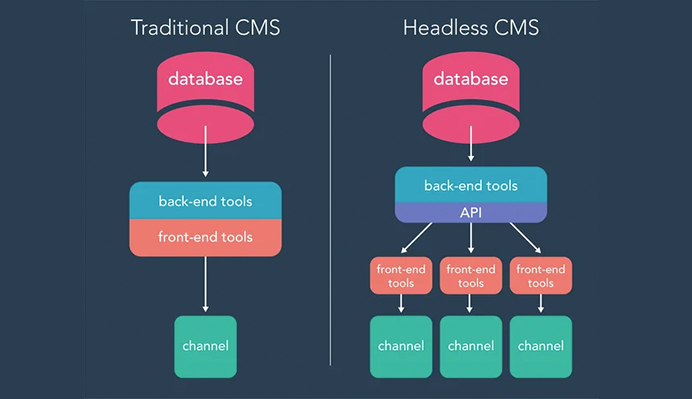
Traditional WordPress operates as a monolithic system where the backend (database, admin panel, PHP processing) and frontend (themes, templates, styling) are tightly coupled. When a visitor requests a page, WordPress queries the database, processes PHP templates, and delivers a complete HTML page. While familiar, this approach creates bottlenecks—every element loads together, limiting performance optimization and design flexibility.
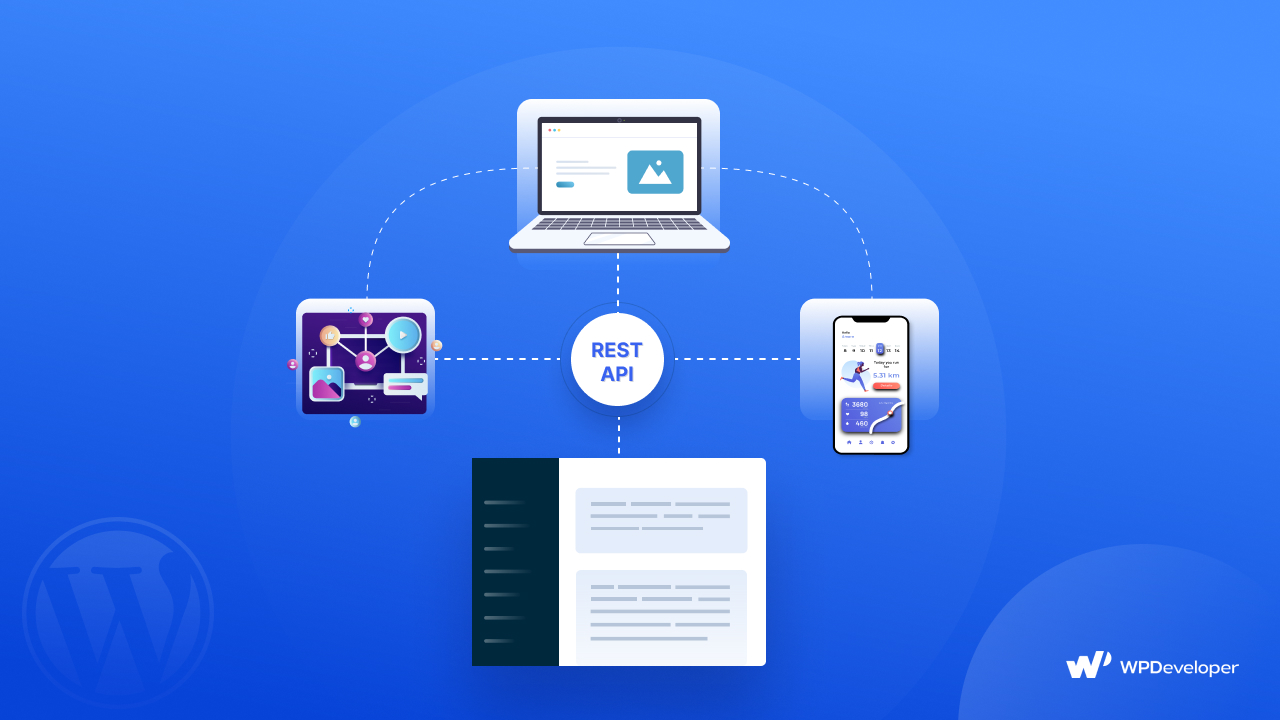
Headless WordPress separates these concerns completely. WordPress serves exclusively as a content repository and management backend, exposing your data through a REST API or GraphQL. The frontend—built with React, Vue, Angular, or any other technology—consumes this data independently, creating interfaces optimized for speed, interactivity, and user experience.
Think of it this way: traditional WordPress is like a restaurant that must prepare and serve everything at once, while headless WordPress is a kitchen (WordPress backend) that delivers ingredients (content via API) to multiple specialized serving stations (React frontend, mobile apps, voice assistants, etc.) that can present them in perfectly optimized ways for each context.
The Three Core Benefits You Can't Ignore
- Blazing Performance: React's virtual DOM and efficient rendering mean your sites load faster and feel more responsive. Average load times often drop from 3-5 seconds to under 1 second—a critical factor when 53% of mobile users abandon sites that take longer than 3 seconds to load.
- Unmatched Flexibility: Design without constraints. Create truly unique user interfaces without wrestling with theme limitations or shortcode dependencies. Your frontend becomes whatever your imagination and React components can build.
- Future-Proof Integration: Connect seamlessly with AI writing assistants, design systems like Figma, static site generators, mobile applications, and emerging technologies through clean API connections.
Why React Is the Perfect Partner for Headless WordPress
The React Advantage for Modern Development
While several frontend frameworks work with headless WordPress, React has emerged as the leading choice for compelling reasons that directly benefit our target audience of AI users, copywriters, and designers:
Component-Based Architecture: React allows you to build interfaces as reusable components. For designers, this means creating a design system once and deploying it consistently everywhere. For copywriters, content modules become standardized and predictable. For AI users, automated content generation can target specific component structures.
Declarative Syntax: React makes code more predictable and easier to debug. Instead of describing how to achieve each state (imperative programming), you describe what the UI should look like for each state. This clarity is invaluable when integrating complex AI content pipelines.
Vibrant Ecosystem: With over 2,000,000 weekly NPM downloads and backing from Facebook, React offers unparalleled community support, pre-built components, and integration tools specifically for headless WordPress implementations.
SEO-Friendly When Implemented Correctly: While early React faced SEO challenges due to client-side rendering, modern solutions like Next.js (a React framework) offer server-side rendering that ensures search engines properly index your content—a critical consideration for content-driven sites.
Implementing Headless WordPress with React: A Step-by-Step Tutorial
Phase 1: Preparing Your WordPress Backend
Before touching React, we need to configure WordPress as a headless CMS:
- Fresh WordPress Installation: Start with a clean WordPress install. Remove unnecessary plugins and choose a minimal theme since the frontend will be handled by React. The Twenty Twenty-One theme works well as a lightweight foundation.
- Enable the REST API: WordPress includes a REST API by default. Verify it's working by visiting yoursite.com/wp-json. You should see a JSON response listing available endpoints.
- Install Essential Plugins:
- JWT Authentication for WP REST API: Securely authenticate API requests between WordPress and React
- Custom Post Type UI: Create structured content types beyond standard posts and pages
- ACF to REST API: Expose Advanced Custom Fields data through the REST API (crucial for structured content)
- Configure Permalinks: Set to "Post name" in Settings > Permalinks for clean API endpoints.
- Set CORS Headers: Add to your wp-config.php or use a plugin to allow your React frontend domain to access the WordPress API:
header("Access-Control-Allow-Origin: https://your-react-domain.com");
header("Access-Control-Allow-Methods: GET, POST, PUT, DELETE, OPTIONS");
header("Access-Control-Allow-Headers: Content-Type, Authorization");
Phase 2: Building Your React Frontend
Now for the exciting part—creating your React application:
- Initialize Your React Project:
npx create-react-app headless-wp-frontend
cd headless-wp-frontend
- Install Essential Packages:
npm install axios react-router-dom @mui/material @emotion/react @emotion/styled
- Axios: For making API requests to WordPress
- React Router: For client-side routing
- Material-UI: For pre-built React components (optional, but accelerates development)
- Create Your First API Connection Component:
import React, { useState, useEffect } from 'react';
import axios from 'axios';

const WordPressPosts = () => {
  const [posts, setPosts] = useState([]);
  const [loading, setLoading] = useState(true);

  useEffect(() => {
    const fetchPosts = async () => {
      try {
        const response = await axios.get('https://your-wordpress-site.com/wp-json/wp/v2/posts');
        setPosts(response.data);
        setLoading(false);
      } catch (error) {
        console.error('Error fetching posts:', error);
        setLoading(false);
      }
    };

    fetchPosts();
  }, []);

  if (loading) return <div>Loading content from WordPress...</div>;

  return (
    <div className="posts-container">
      <h1>Latest from Our WordPress Backend</h1>
      {posts.map(post => (
        <article key={post.id} className="post-card">
          <h2 dangerouslySetInnerHTML={{ __html: post.title.rendered }} />
          <div dangerouslySetInnerHTML={{ __html: post.excerpt.rendered }} />
          <a href={`/post/${post.slug}`}>Read More</a>
        </article>
      ))}
    </div>
  );
};

export default WordPressPosts;
- Implement Dynamic Routing:
- Set up React Router to handle different content types from WordPress:
import { BrowserRouter as Router, Routes, Route } from 'react-router-dom';
import WordPressPosts from './components/WordPressPosts';
import SinglePost from './components/SinglePost';
import Page from './components/Page';

function App() {
  return (
    <Router>
      <Routes>
        <Route path="/" element={<WordPressPosts />} />
        <Route path="/post/:slug" element={<SinglePost />} />
        <Route path="/page/:slug" element={<Page />} />
      </Routes>
    </Router>
  );
}
Phase 3: Advanced Integration Techniques
Connecting AI Writing Tools to Your Headless Architecture
For AI users and copywriters, one of the most powerful aspects of headless WordPress with React is seamless AI integration:
// Example: AI Content Generation Component
import React, { useState } from 'react';
import axios from 'axios';

const AIContentGenerator = ({ postId }) => {
  const [aiContent, setAiContent] = useState('');
  const [generating, setGenerating] = useState(false);

  const generateWithAI = async () => {
    setGenerating(true);

    // Call your AI service (OpenAI, Jasper, etc.)
    const aiResponse = await axios.post('https://your-ai-service.com/generate', {
      prompt: 'Write a blog post introduction about headless WordPress',
      tone: 'professional',
      length: 'medium'
    });

    // Update WordPress via REST API
    await axios.post(`https://your-wordpress-site.com/wp-json/wp/v2/posts/${postId}`, {
      content: aiResponse.data.content
    }, {
      headers: {
        'Authorization': 'Bearer YOUR_JWT_TOKEN'
      }
    });

    setAiContent(aiResponse.data.content);
    setGenerating(false);
  };

  return (
    <div className="ai-generator">
      <button onClick={generateWithAI} disabled={generating}>
        {generating ? 'Generating with AI...' : 'Enhance with AI'}
      </button>
      {aiContent && (
        <div className="ai-output">
          <h3>AI-Generated Content:</h3>
          <p>{aiContent}</p>
        </div>
      )}
    </div>
  );
};
Design System Integration for Designers
Designers can create consistent, reusable components that connect directly to WordPress content:
// Design System Component Example
import React from 'react';
import { Card, CardContent, Typography, Button } from '@mui/material';

const ContentCard = ({ title, excerpt, imageUrl, link }) => {
  return (
    <Card sx={{ maxWidth: 345, margin: 2 }}>
      {imageUrl && (
        <img
          src={imageUrl}
          alt={title}
          style={{ width: '100%', height: '200px', objectFit: 'cover' }}
        />
      )}
      <CardContent>
        <Typography gutterBottom variant="h5" component="div">
          {title}
        </Typography>
        <Typography variant="body2" color="text.secondary">
          {excerpt}
        </Typography>
      </CardContent>
      <Button size="small" href={link}>Read More</Button>
    </Card>
  );
};

// Usage with WordPress data
const PostsGrid = ({ posts }) => {
  return (
    <div style={{ display: 'flex', flexWrap: 'wrap' }}>
      {posts.map(post => (
        <ContentCard
          key={post.id}
          title={post.title.rendered}
          excerpt={post.excerpt.rendered.replace(/<[^>]+>/g, '')}
          imageUrl={post.featured_media_url}
          link={`/post/${post.slug}`}
        />
      ))}
    </div>
  );
};
Performance Optimization: Making Your Headless Site Blazing Fast
Implement Static Site Generation (SSG) with Next.js
For maximum performance, consider using Next.js instead of plain React:
- Initialize Next.js Project:
npx create-next-app headless-wp-next
cd headless-wp-next
- Pre-render Pages at Build Time:
// pages/posts/[slug].js
export async function getStaticPaths() {
  const res = await fetch('https://your-wordpress-site.com/wp-json/wp/v2/posts');
  const posts = await res.json();

  const paths = posts.map(post => ({
    params: { slug: post.slug }
  }));

  return { paths, fallback: false };
}

export async function getStaticProps({ params }) {
  const res = await fetch(
    `https://your-wordpress-site.com/wp-json/wp/v2/posts?slug=${params.slug}`
  );
  const post = await res.json();

  return { props: { post: post[0] } };
}

export default function Post({ post }) {
  return (
    <article>
      <h1>{post.title.rendered}</h1>
      <div dangerouslySetInnerHTML={{ __html: post.content.rendered }} />
    </article>
  );
}
Advanced Caching Strategies
- Implement SWR (Stale-While-Revalidate):
npm install swr
import useSWR from 'swr';

const fetcher = url => fetch(url).then(r => r.json());

function Posts() {
  const { data, error } = useSWR(
    'https://your-wordpress-site.com/wp-json/wp/v2/posts',
    fetcher,
    { revalidateOnFocus: false }
  );

  if (error) return <div>Failed to load</div>;
  if (!data) return <div>Loading...</div>;

  return (
    <div>
      {data.map(post => (
        <PostItem key={post.id} post={post} />
      ))}
    </div>
  );
}
- CDN Configuration: Serve your React build from a global CDN like Vercel, Netlify, or Cloudflare for sub-second global load times.
Real-World Applications for Your Professional Workflow
For AI Content Professionals
Headless WordPress with React enables automated content pipelines where AI-generated content flows seamlessly from writing tools to publication. Create custom React interfaces that:
- Preview AI-generated content before publishing
- Batch process content updates via WordPress REST API
- Integrate multiple AI services (GPT-3, Jarvis, Copy.ai) with a unified interface
- Automatically optimize content for SEO based on real-time performance data
For Design-Focused Creatives
Designers gain unprecedented creative freedom:
- Build truly custom layouts without theme constraints
- Implement advanced animations and micro-interactions
- Create design systems that automatically populate with WordPress content
- Develop component libraries that work across multiple client projects
- Implement dark/light mode toggles, accessibility features, and responsive behaviors that traditional WordPress themes struggle with
For Copywriters and Content Strategists
Enjoy enhanced content management capabilities:
- Custom editing interfaces tailored to specific content types
- Real-time collaboration features beyond the standard WordPress editor
- Content versioning and A/B testing interfaces
- Performance analytics integrated directly into your workflow
- Seamless multi-channel publishing (web, email, social) from a single content source
Overcoming Common Challenges in Headless WordPress Development
Authentication and Security
Securing your headless setup requires proper implementation:
- JWT Authentication Setup:
// In your WordPress theme's functions.php or a custom plugin
add_filter('rest_authentication_errors', function($result) {
  if (!empty($result)) {
    return $result;
  }
  if (!is_user_logged_in()) {
    return new WP_Error('rest_not_logged_in', 'You are not currently logged in.', array('status' => 401));
  }
  return $result;
});
- Secure API Keys for External Services: Never expose API keys in client-side code. Implement serverless functions (Vercel, Netlify Functions) as proxies.
SEO Implementation
Address SEO concerns with these strategies:
- Server-Side Rendering (SSR): Use Next.js or Gatsby for proper HTML delivery to search engines.
- Dynamic Meta Tags:
import { Helmet } from 'react-helmet';

function PostPage({ post }) {
  return (
    <>
      <Helmet>
        <title>{post.title.rendered} | Your Site</title>
        <meta name="description" content={post.excerpt.rendered.replace(/<[^>]+>/g, '')} />
        <meta property="og:title" content={post.title.rendered} />
        <meta property="og:description" content={post.excerpt.rendered.replace(/<[^>]+>/g, '')} />
        <meta property="og:image" content={post.featured_image} />
      </Helmet>
      {/* Page content */}
    </>
  );
}
- XML Sitemaps: Generate dynamically using serverless functions that query your WordPress API.
The Future-Proof Advantage: Why Now Is the Time to Transition
The digital landscape is shifting toward Jamstack architecture (JavaScript, APIs, and Markup), with headless CMS implementations growing at 25% annually. For AI users, the ability to integrate machine learning models directly into content workflows represents a competitive advantage that traditional WordPress simply cannot match efficiently. For designers, the demand for unique, performant digital experiences has never been higher, and client expectations now include the interactive polish that React enables natively. For copywriters and content professionals, the efficiency gains from streamlined workflows and multi-channel publishing directly impact output quality and volume.
Your competitors are already making this transition. Agencies report 60% faster development times and 40% better performance scores after moving to headless WordPress with React. The learning curve, while real, pays dividends in increased capabilities, better project outcomes, and premium service offerings.
Conclusion: Transform Your Creative Workflow Today
Headless WordPress with React represents more than a technical architecture choice—it's a strategic advantage for modern creatives, AI professionals, and content experts. By decoupling your



0 comments:
Post a Comment