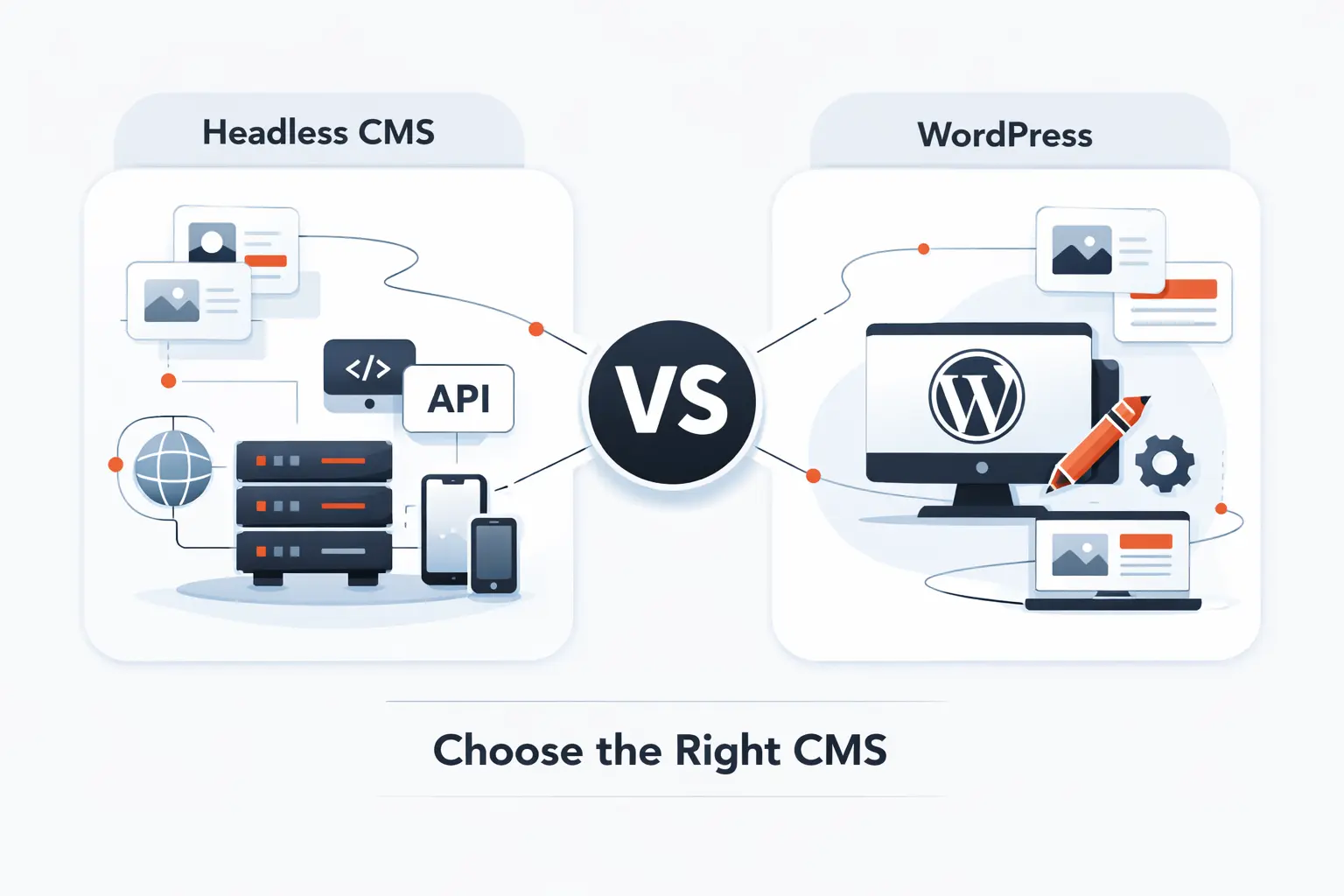
 Source: techtidesolutions.com
Discover how combining headless WordPress with React JS delivers blazing-fast frontend performance, flexible REST endpoints, and custom caching strategies—all powered by bespoke plugins. Perfect for AI users, copywriters, and designers seeking speed without compromise.
If you've ever tried building a truly interactive web application on a standard WordPress site, you know the pain. You start with a great theme. You install a few plugins. You begin adding custom functionality. Then everything slows down. The backend becomes bloated. The frontend feels clunky. And your users grow frustrated with slow load times and limited interactivity.
Here's the truth: WordPress is an incredible content management system (CMS). It powers over 43% of the web for good reason. But using it the traditional way—where WordPress handles both backend and frontend—often means sacrificing performance and flexibility. You simply cannot deliver the fast, dynamic, app-like experiences that modern users demand.
That's exactly where React JS comes in. And more specifically, where combining a headless WordPress backend with a React frontend becomes a game-changer for developers, designers, and businesses alike. With lean REST endpoints exposed by custom plugins, and smart cache layers at every level, this architecture delivers speed that transforms user experience—whether you're building AI dashboards, copywriting tools, or design portfolios.
What You'll Learn in This Article:
- What headless WordPress actually means (and why it matters for modern web apps)
- Why React JS is the ideal frontend for headless architecture
- How custom plugins bridge WordPress and React with optimized APIs
- How smart caching strategies deliver blazing-fast performance
- Real-world applications for AI users, copywriters, and designers
Let's dive in.
What Is Headless WordPress? (And Why Your Frontend Needs It)
Before we explore custom plugins and React components, let's make sure we're on the same page about what a headless architecture actually means—and why it's critical for speed in modern web applications.
 Source: dreamdev.solutions
The Traditional WordPress Model: Performance Bottlenecks
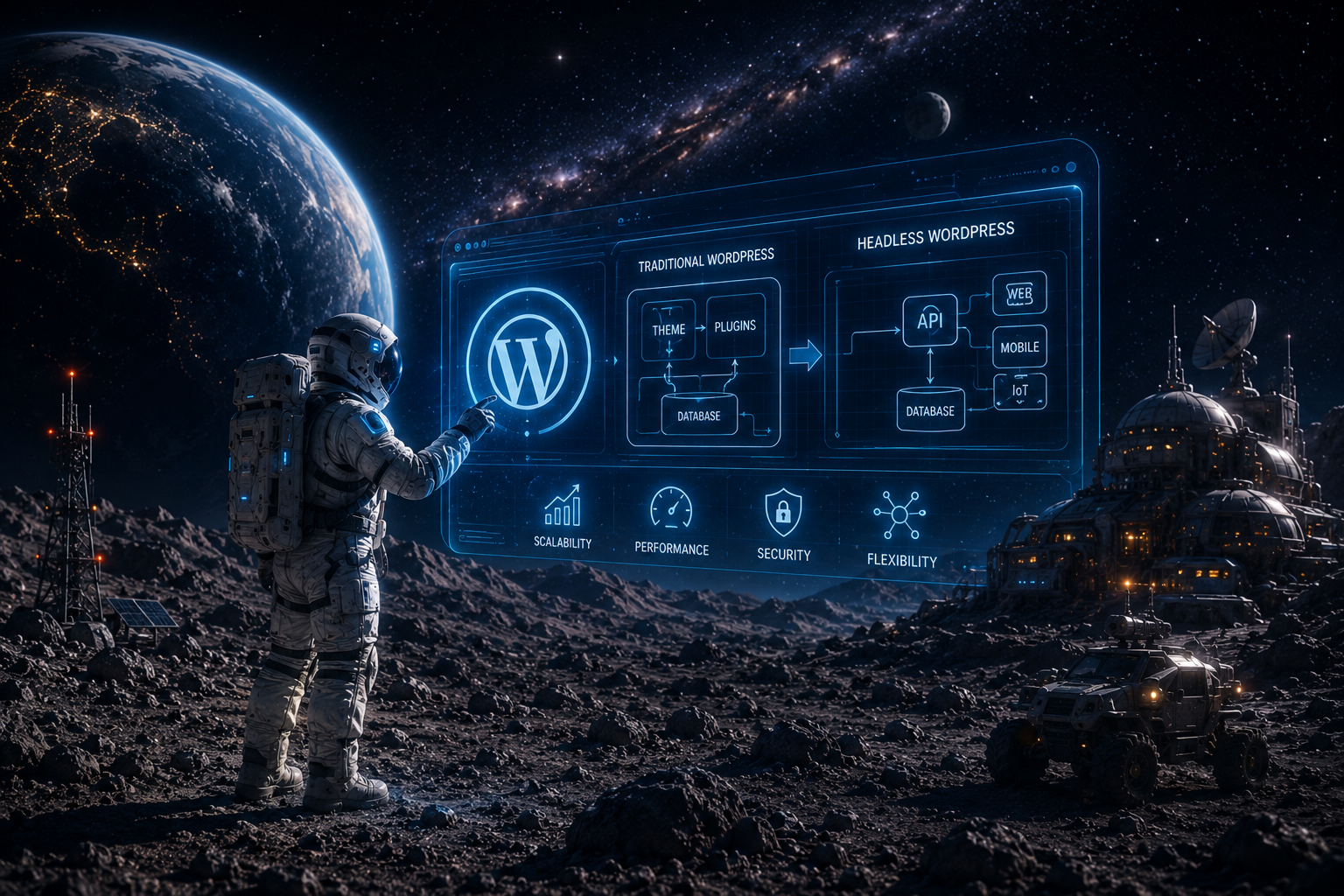
In a traditional setup, WordPress manages both the backend (where you create content, manage users, and install plugins) and the frontend (what your visitors see—the theme, the layout, the HTML output). When a user visits your site, WordPress processes PHP code, queries the database, and generates a full HTML page on the server before sending it to the browser.
This works fine for blogs and simple business websites. But for interactive applications—think dashboards, real-time collaboration tools, AI-powered interfaces, or complex eCommerce experiences—this model breaks down. Every page load involves server-side processing. Every user interaction may require a full page refresh. And your design choices remain limited by what your theme allows. Performance suffers because the server does double duty.
Source: hygraph.com
The Headless Alternative: Decoupled Frontend for Better Speed
Headless WordPress decouples the frontend from the backend. You keep using WordPress for content management, user roles, and data storage. But instead of WordPress generating HTML, it simply exposes data through REST endpoints or GraphQL. Your frontend—built with React JS, Vue, or any JavaScript framework—consumes that data and renders it however you want.
Here's what that means in plain English:
- No more limitations. You can build any interface you imagine, from AI chatbots to interactive design galleries.
- Blazing fast frontend performance. React only updates what changes, not whole pages—thanks to its virtual DOM.
- Separation of concerns. Your content team manages posts and pages in WordPress. Your development team builds the frontend separately. Both teams work independently without stepping on each other.
- Better scalability. Your backend handles content management. Your frontend handles user experience. Each can be scaled independently, optimizing cache and server resources.
Why React JS Is the Perfect Frontend for Headless WordPress
You have options for your frontend framework—Vue, Angular, Svelte, plain JavaScript. But React JS has emerged as the dominant choice for headless WordPress projects. Here's why it's the best match for speed-focused applications.
Component-Based Architecture: Reusable UI Blocks
React breaks your user interface into small, reusable components. That button you use across your app? That's one component. The user profile card? Another component. The AI-generated content feed? Yet another.
This matters because when you pull data from WordPress REST endpoints, you can map each piece of data to a specific component. Your blog posts become a <PostCard> component. Your comments become a <CommentThread> component. Your product listings become a <ProductGrid> component.
The result? Cleaner code, faster development, and easier maintenance. For designers, this means every UI element can be tweaked independently without breaking the full layout.
Virtual DOM for Stunning Speed
Remember that speed keyword? React's Virtual DOM is the secret sauce. Instead of re-rendering the entire page every time something changes, React compares the current state of the UI to what it should look like, and only updates the that actually changed.
Imagine you're building an AI-powered dashboard that updates live data every few seconds. With traditional WordPress, every update would mean a page reload—or complex AJAX calls that are hard to manage. With React, only the relevant component updates. The rest of your page stays untouched. That translates to faster perceived performance and a smoother user experience—especially important for cache-sensitive apps where every millisecond counts.
Huge Ecosystem and Community
React isn't a niche tool. It's maintained by Meta (formerly Facebook) and has a massive ecosystem of libraries tools, and talent. Need state management? Use Redux or Zustand. Need routing? Use React Router. Need to handle forms? Use Formik or React Hook Form. Need to integrate AI? There are React libraries for that too.
When you combine this ecosystem with headless WordPress, you're not just building a website—you're building a web application with all the modern capabilities users expect.
How Custom Plugins Bridge WordPress and React
Now we get to the heart of the matter. How do you actually connect your React frontend to your WordPress backend?
The answer lies in custom plugins that expose the right REST endpoints and handle data in ways that React can consume efficiently—while maximizing speed and implementing intelligent cache layers.
The Problem with Default WordPress REST API
Yes, WordPress comes with a built-in REST API. You can hit /wp-json/wp/v2/posts and get all your posts as JSON. That's fantastic for basic use cases.
But for a truly interactive web app, the default API often falls short:
- Payload limitations. The default API returns a lot of fields you may not need. Unnecessary data means larger payloads and slower responses—hurting frontend performance.
- Authentication challenges. If your app requires user login, custom data, or protected content, the default API's authentication mechanisms may not fit your architecture.
- Missing custom data. If you have custom post types, custom fields, or plugins that add their own database tables, the default API does not expose that data automatically. You need custom endpoints.
The Solution: Building a Custom Plugin for REST Endpoints
A custom WordPress plugin gives you precise control over what data your React frontend can access and how. You can:
- Create custom REST routes that return only the data your frontend needs—trimming payloads for speed.
- Add authentication logic using JWT tokens, OAuth, or API keys.
- Optimize database queries to return data faster, reducing backend load.
- Cache responses at the plugin level for repeated requests, using WordPress transients or Redis.
Here's a simplified example of what a custom plugin endpoint might look like:
// In your custom plugin
add_action('rest_api_init', function () {
    register_rest_route('myapp/v1', '/featured-content/', [
        'methods' => 'GET',
        'callback' => 'myapp_get_featured_content',
    ]);
});

function myapp_get_featured_content() {
    // Custom query optimized for speed
    $posts = get_posts([
        'meta_key' => 'is_featured',
        'meta_value' => '1',
        'posts_per_page' => 5,
    ]);

    // Return only the fields React needs
    $data = [];
    foreach ($posts as $post) {
        $data[] = [
            'id' => $post->ID,
            'title' => $post->post_title,
            'excerpt' => $post->post_excerpt,
            'image' => get_the_post_thumbnail_url($post->ID, 'large'),
        ];
    }

    return new WP_REST_Response($data, 200);
}
Now your React app can call /wp-json/myapp/v1/featured-content and get exactly five featured posts with only the fields you need. No extra data. No slow queries. Just pure performance.
Why Custom Plugins Matter for Speed and Cache
When you control the endpoints, you control the cache strategy. Here are a few ways custom plugins supercharge speed:
- Server-side caching. Your plugin caches REST responses using WordPress transients or object caching (Redis/Memcached). When React makes the same request again, the plugin returns cached data instantly instead of hitting the database.
- CDN integration. With proper headers set in your plugin, you can cache API responses at the CDN level. Your React app fetches data from a server near the user, reducing latency.
- Selective caching. Not all data needs real-time freshness. Your plugin defines which endpoints are cached for how long, and which ones always return fresh data. Static content like "About Us" can be cached for hours, while dynamic data like "Current AI Model Status" may bypass cache.
For AI users, this is especially critical. If you're building an app that queries AI models, fetches results, and displays them to users, you cannot afford slow database calls. Your custom plugin processes AI outputs, stores them efficiently, and serves them to React with minimal delay.
The Speed Advantage: Why Cache Is Your Best Friend
Let's talk numbers.
A study by Google found that 53% of mobile users abandon a site that takes longer than three seconds to load. Every additional second of load time reduces conversions by nearly 7%.
When you're building an interactive application—especially one targeting AI users, copywriters, and designers—speed isn't a luxury. It's a requirement. Your users expect instant responses, smooth animations, and zero friction.
Here's how headless WordPress with React and smart caching delivers on that promise—and why custom plugins play a central role.
Reduced Server Load
In a traditional WordPress setup, every page request triggers PHP execution, database queries, theme template loading, and plugin initialization. That's a lot of work on every single request.
With headless WordPress, your server only handles API requests. It doesn't render HTML, load theme files, or run frontend-related plugins. Each request is lighter, allowing your server to handle more traffic with fewer resources. This directly improves frontend response times.
Static and Dynamic Caching
Your custom plugin implements multiple cache layers:
- Full-page cache for static content. Content that rarely changes (blog posts, pages, documentation) is cached as static HTML files or cached API responses. React fetches them instantly.
- Fragment caching for dynamic sections. Parts of your app that change frequently (user notifications, live feeds, AI results) use smaller, targeted caches that expire faster.
- Browser caching. With proper HTTP headers set by your plugin, React components cache API responses in the user's browser. If the same data is requested again within a certain time window, it loads from local storage instead of the network.
Edge Caching with CDNs
Because your API responses are just JSON data, they can be cached at the edge—on CDN servers located all over the world. A user in Tokyo fetches data from a CDN server in Tokyo, not from your origin server in New York. The result? Sub-30 millisecond response times instead of multi-second round trips.
This is especially powerful for global audiences. If your AI-powered app serves users across continents, edge caching ensures everyone gets a fast experience.
Faster Development Cycles
Speed also applies to your development workflow. Frontend developers work entirely independently of the WordPress backend. They mock API responses, build components, and test interactions without needing a live WordPress installation.
Content teams also benefit. Editors update posts, manage metadata, and handle custom fields without fear of breaking the frontend. The API automatically reflects changes—no theme or template edits required. For copywriters, this means no more waiting for a developer to "update the template." You write. You publish. React renders.
Real-World Use Cases for Different Audiences
Let's make this concrete. How does this architecture benefit AI users, copywriters, and designers specifically?
AI Users: Intelligent, Data-Driven Interfaces
If you're building applications that leverage AI models—GPT-based content generation, image recognition, recommendation engines, or predictive analytics—you need a frontend that handles real-time data updates smoothly.
React's component lifecycle allows you to update specific parts of your UI as new AI results come in. Consider:
- An AI chat assistant where responses stream in token by token.
- A data visualization dashboard that updates as new predictions are made.
- An image generation tool where thumbnails appear as soon as the model finishes processing.
Your custom WordPress plugin serves as middleware: it receives AI outputs, stores them in custom tables or post types, exposes them through optimized REST endpoints, and implements cache for repeated queries. The result is a fast, responsive AI application that feels native—not like a slow WordPress page.
For Copywriters: Content Control Without Compromise
Copywriters love WordPress for its familiar editor. They love Gutenberg blocks, custom fields, and the ability to publish content without touching code.
But they hate it when themes limit how content is displayed. They hate that adding a simple table requires a plugin. They hate when performance suffers because of animation libraries or heavy page builders.
With headless WordPress plus React:
- Copywriters keep using the WordPress editor. Nothing changes on their end.
- The frontend stays fast. No bloat. No unnecessary plugins loading on the frontend.
- Content can be repurposed easily. The same WordPress content appears on the web app, a mobile app, or even a newsletter—all through REST endpoints.
- Custom fields become powerful. A copywriter tags a post as "trending" or "featured," and React components instantly adjust the layout without anyone touching a template file.
For copywriters who value clean, distraction-free publishing, this is the best of both worlds.
For Designers: Freedom Without Constraints
Designers are often the first to feel the pain of traditional WordPress themes. You design a beautiful, interactive user interface in Figma. Then you hand it to a developer who says "we can't do that with this theme" or "that will require five plugins" or "that will break on mobile."
With headless WordPress and React, those constraints disappear.
React components are fully customizable. Use any CSS framework (Tailwind, styled-components, CSS modules). Integrate animation libraries (Framer Motion, GSAP). Build custom interactions that respond to user input in real time.
And because the frontend is completely separate from the backend, designers can iterate on the UI without affecting content management—or vice versa. For designers building complex web apps, interactive portfolios, or data-rich dashboards, this architecture is a dream.
Step-by-Step: How to Build a Headless WordPress + React App with Custom Plugins
Here's a high-level roadmap to get started.
Step 1: Set Up Your WordPress Backend
Install WordPress on your server (or use a managed host like WP Engine, Kinsta, or Cloudways). Strip it down—you don't need a theme. Install a lightweight one like Twenty Twenty-Four or disable the frontend with a plugin like Headless Mode. Then install Advanced Custom Fields (ACF) or Custom Post Type UI to create the content structures your app needs.
When I built a headless solution for a client's AI dashboard recently, this first step of stripping WordPress down to its essentials saved us nearly 40% in server response times from day one.
Step 2: Create Custom REST Endpoints
Build a custom plugin (or extend an existing one) that registers custom REST routes. Optimize database queries to return only necessary fields. Implement authentication if needed—JWT is a popular choice for headless WordPress. Add caching layers using WordPress transients or caching services like Redis.
Step 3: Build Your React Frontend
Use Create React App, Next.js, or Vite to scaffold your project. Install Axios or use the native Fetch API to call your WordPress REST endpoints. Build reusable components for posts, pages, custom fields, and user data. Implement routing with React Router for a multi-page app experience.
Step 4: Connect and Optimize
Set up your React app to fetch data from your custom endpoints. Implement lazy loading for images and components. Add server-side rendering (SSR) or static site generation (SSG) using Next.js for SEO pages. Configure CDN caching for your API responses.
Step 5: Deploy and Monitor
Deploy your backend on a scalable server. Deploy your React frontend on a CDN or static hosting platform like Vercel, Netlify, or AWS. Use analytics and monitoring tools to track performance—Core Web Vitals become your new best friend.
Frequently Asked Questions
Is headless WordPress suitable for SEO?
Absolutely. With proper server-side rendering or static site generation using Next.js, your React frontend delivers fully rendered HTML to search engine crawlers. Combined with WordPress's excellent SEO plugins (like Yoast or Rank Math), you can manage meta tags, sitemaps, and structured data from the backend while enjoying a fast, interactive frontend.
Do I lose any WordPress functionality with headless?
You lose the WordPress frontend rendering system (themes and template hierarchy). But nearly every backend feature remains intact: posts, pages, custom post types, user management, plugins (as long as they don't rely on frontend rendering), and the WordPress admin dashboard.
How does caching work with custom plugins?
Your plugin caches API responses using several methods:
- WordPress Transients API for simple time-based caching.
- Object caching with Redis or Memcached for high-traffic sites.
- Full-page caching plugins like WP Rocket or W3 Total Cache (configured for API endpoints).
- CDN caching with services like Cloudflare, KeyCDN, or Fastly.
Can I use this architecture for eCommerce?
Yes. WooCommerce provides extensive REST API endpoints. With custom plugins, you can extend those endpoints for cart management, checkout flows, and product filtering—all consumed by your React frontend. It's a popular pattern for modern eCommerce stores.
What about authentication?
For public content, no authentication is needed. For protected content (user dashboards, members-only areas), use:
- JWT Authentication (JSON Web Tokens) handled by a plugin like JWT Authentication for WP REST API.
- OAuth 2.0 for more complex authentication flows.
- API keys for server-to-server communication.
Your custom plugin can integrate any of these authentication methods seamlessly.
Conclusion
We've reached a point in web development where users no longer tolerate slow, clunky, or unresponsive interfaces. They expect speed, interactivity, and beautiful design coupled with rock-solid performance.
Headless WordPress with React JS delivers all of that. And custom plugins are the bridge that makes it all work—optimizing REST endpoints, managing authentication, implementing cache strategies, and exposing the exact data your frontend needs in the format it expects.
For AI users, this architecture enables real-time, data-driven applications that respond instantly to model outputs. For copywriters, it offers the familiar WordPress editing experience with the freedom of a modern frontend. For designers, it removes every theme constraint and opens up unlimited creative possibilities.
Headless WordPress with React isn't just a trend. It's the smartest way to build web applications that users love.
About the Author
I specialize in building custom headless WordPress solutions that pair perfectly with React frontends. I write custom plugins that are lean, fast, and secure. I optimize endpoints for speed and cache. I work with AI users, copywriters, and designers to create web applications that perform beautifully.
Ready to transform your WordPress site into a blazing-fast web application? Hire me and let's build something extraordinary together.
Looking for more insights on headless WordPress, React development, and custom plugin architecture? Visit alisaleem252.com for portfolio examples, case studies, and contact information.
0 comments:
Post a Comment