
Source: developer.woocommerce.com
Introduction: Why Third-Party API Integration in WooCommerce Decides Whether Your Store Scales
WooCommerce powers more than 20% of all online stores, yet no single plugin can deliver everything a modern merchant needs. Shipping carriers, ERPs, CRMs, subscription engines, tax services, and marketing platforms all live outside WordPress—and they all communicate through APIs. Mastering API integration with third-party APIs in WooCommerce is what separates a store that merely sells from one that scales.
The challenge is not connecting to an API; it is connecting reliably. WooCommerce runs inside WordPress on shared hosting, PHP execution limits, and unpredictable traffic spikes. A naive
wp_remote_get() call inside a checkout hook can stall a customer's payment or silently drop an order sync. A synchronous call inside woocommerce_checkout_update_order_meta, for example, can add 8–15 seconds to checkout when the upstream API is slow—turning a completed sale into an abandoned cart. This guide walks through the architecture, authentication, code patterns, and operational safeguards that professional web developers use to build third-party API integrations that hold up under production load.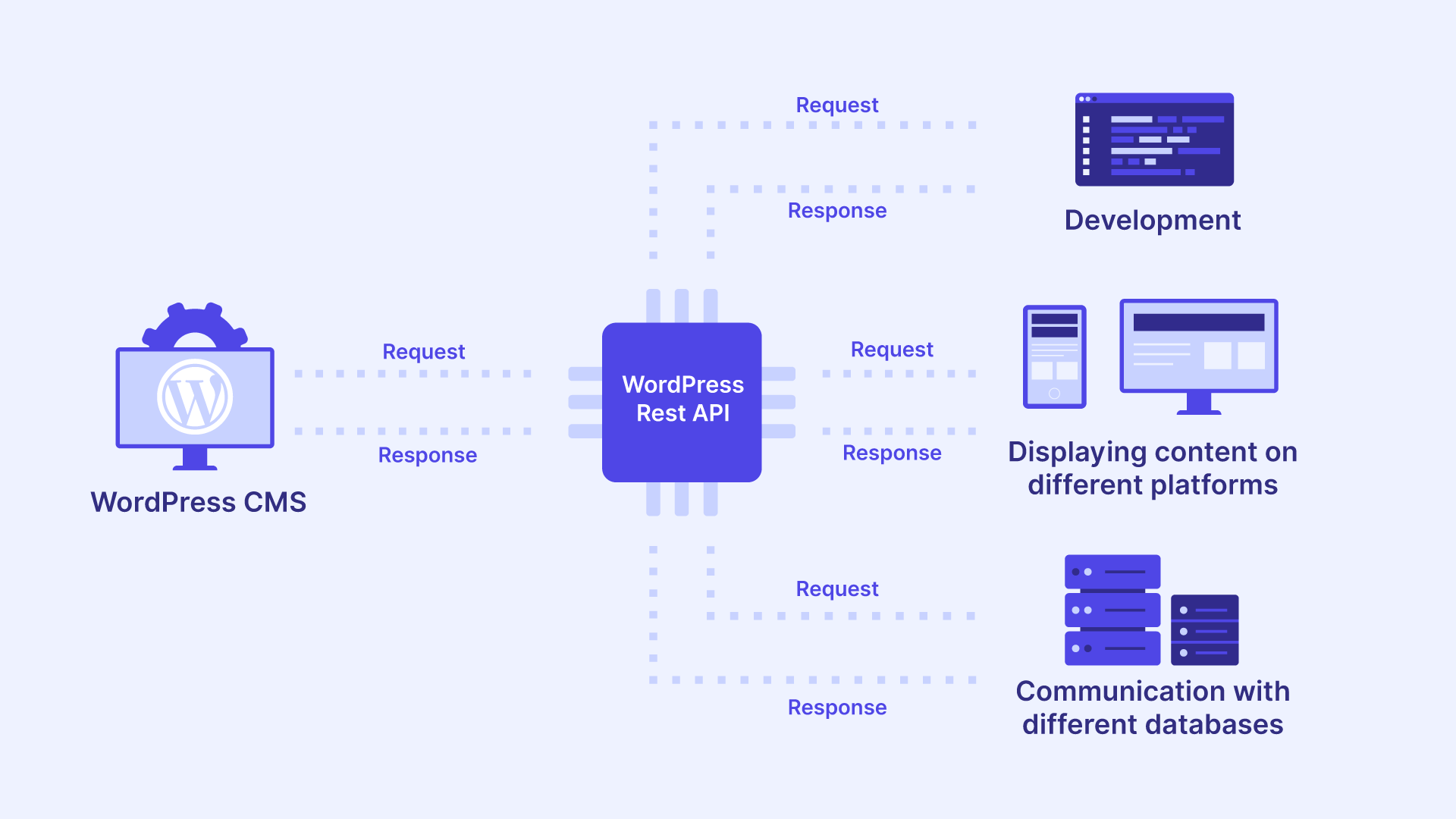
Source: wp-umbrella.com
Understanding the WooCommerce API Landscape
Before writing a single line of code, it helps to separate the two directions of traffic.
Source: wp-umbrella.com
The WooCommerce REST API (Inbound)
WooCommerce exposes its own REST API at
/wp-json/wc/v3/, covering products, orders, customers, coupons, and reports. This is how external systems read from or write to your store—think a mobile app pushing inventory, or an ERP pulling completed orders.Third-Party APIs (Outbound)
Outbound integrations send WooCommerce data to an external service: creating a shipment in a carrier's system (ShipStation, Shippo), syncing a customer to a CRM (HubSpot, Salesforce), or issuing an invoice through accounting software (QuickBooks, Xero). Most WooCommerce integration bugs live here, because outbound calls depend on a third party's uptime, latency, and rate limits.
Choosing a Communication Pattern
Inbound and outbound traffic aren't the only axis to think about. You also need to decide how data moves between systems—and each pattern carries different reliability and performance tradeoffs.
| Pattern | Direction | Best For |
|---|---|---|
| REST request/response | Outbound | Order sync, inventory push, address validation |
| Webhooks | Inbound | Real-time notifications (shipped, paid, refunded) |
| Scheduled polling | Both | Batch reconciliation, stock level refresh |
Choosing the right pattern matters. Webhooks eliminate polling overhead but require a publicly reachable, signature-verified endpoint. Request/response is simpler but must never block a user-facing request. Polling is the fallback when neither side can push—use it for reconciliation, not for real-time sync.
Prerequisites and Authentication for WooCommerce API Integration
What You Need Before You Start
- WooCommerce 8.0+ running on PHP 8.1 or higher
- HTTPS enforced site-wide (never send API keys over HTTP)
- A staging environment with sandbox credentials
- Access to
wp-config.php for secure constant storageChoosing an Authentication Method
The right auth model depends on who is calling whom. Match the method to the trust relationship, not to whatever the provider's docs list first.
| Method | Use When | Notes |
|---|---|---|
| API keys / Basic Auth | Server-to-server calls where the credential never touches a browser | Simplest; rotate regularly |
| OAuth 2.0 | A service acts on behalf of a merchant (marketplaces, analytics platforms) | Handles token refresh; more setup |
| JWT | Stateless microservice calls | Short-lived tokens; verify signature server-side |
For inbound webhooks, always verify an HMAC signature header before processing the payload—an unverified webhook endpoint is an open door for forged order events.
Store credentials in
wp-config.php or environment variables—never in the database as plain text, and never in a JavaScript file. A leaked CRM token is a data breach, not a bug.Step-by-Step: Building a Third-Party API Integration in WooCommerce
With credentials stored and the right event identified, the integration itself becomes a five-step process: hook, map, queue, send, and verify.
Step 1: Hook Into the Right WooCommerce Event
WooCommerce fires hundreds of actions. Pick the narrowest one that matches your business event.
add_action( 'woocommerce_order_status_completed', 'myplugin_sync_order_to_crm', 10, 1 );Step 2: Build a Clean Payload
Map WooCommerce order data into the third party's expected schema. Avoid passing raw
WC_Order objects.function myplugin_sync_order_to_crm( $order_id ) {
$order = wc_get_order( $order_id );
if ( ! $order ) {
return;
}
$payload = array(
'reference' => $order->get_order_number(),
'total' => (float) $order->get_total(),
'currency' => $order->get_currency(),
'customer' => array(
'email' => $order->get_billing_email(),
'name' => $order->get_formatted_billing_full_name(),
),
);
myplugin_queue_request( $order_id, $payload );
}Step 3: Queue Instead of Blocking
The critical architectural decision: never call an external API synchronously inside a customer-facing hook. Use Action Scheduler (bundled with WooCommerce) to process the request in the background with automatic retries.
function myplugin_queue_request( $order_id, $payload ) {
    as_enqueue_async_action(
        'myplugin_send_order',
        array( 'order_id' => $order_id, 'payload' => $payload ),
        'myplugin-integration'
    );
}
Step 4: Make the Request With Guardrails
Two patterns do the heavy lifting here. First, an
Idempotency-Key—a unique request identifier that tells the API to ignore duplicates—ensures a retried request never creates a duplicate record. Second, throwing an exception on failure tells Action Scheduler to retry automatically with backoff.add_action( 'myplugin_send_order', 'myplugin_send_order_handler', 10, 2 );
function myplugin_send_order_handler( $order_id, $payload ) {
$response = wp_remote_post(
'https://api.your-crm-provider.com/v2/orders',
array(
'timeout' => 15,
'headers' => array(
'Authorization' => 'Bearer ' . MYPLUGIN_CRM_TOKEN,
'Content-Type' => 'application/json',
// Unique per order — retries won't duplicate the record.
'Idempotency-Key' => 'wc-order-' . $order_id,
),
'body' => wp_json_encode( $payload ),
)
);
// Throwing signals Action Scheduler to retry with backoff.
if ( is_wp_error( $response ) ) {
throw new Exception( $response->get_error_message() );
}
if ( wp_remote_retrieve_response_code( $response ) >= 500 ) {
throw new Exception( 'Upstream error' );
}
}Step 5: Verify the Response and Record the Outcome
A 200 response is not proof of success. Check the response body for the third party's own status field, then persist the external ID so future operations (refunds, cancellations, status updates) can reference it.
function myplugin_send_order_handler( $order_id, $payload ) {
    // ... request code above ...

    $code = wp_remote_retrieve_response_code( $response );
    $body = json_decode( wp_remote_retrieve_body( $response ), true );

    if ( 200 !== $code || empty( $body<a href="https://woocommerce.github.io/woocommerce-rest-api-docs/">'id'] ) ) {
        throw new Exception( 'Unexpected response shape' );
    }

    // Store the external ID for later reconciliation.
    $order = wc_get_order( $order_id );
    $order->update_meta_data( '_crm_order_id', sanitize_text_field( $body['id'] ) );
    $order->save();
}
If you skip this step, you'll have no way to match a WooCommerce order to its CRM counterpart when a customer calls support six weeks later.
Best Practices for Reliable WooCommerce API Integrations
The code above works in a demo. Here's what breaks it in production—and how to prevent each failure.
Respect Rate Limits
Read the
Retry-After and X-RateLimit-Remaining headers, and implement exponential backoff (waiting progressively longer between retries). A burst of 200 order syncs after a flash sale will trip most APIs. If you're firing requests in a loop, add a small delay between them and stop when the remaining count drops below a safety threshold.Log Everything, Expose Nothing
Write structured logs to a custom table or a monitoring service. Capture the request ID, endpoint, response code, and duration. Never surface API error bodies to customers—they often contain internal identifiers, stack traces, or partial tokens.
Isolate Failures
One broken integration should not disable checkout. Wrap third-party calls in try/catch blocks and degrade gracefully. If the CRM is down, the order should still complete; the sync should retry later.
Version Your Endpoints
Pin to
/v2/ rather than /latest/. When a provider deprecates a version, you want a scheduled migration, not an emergency. Add a calendar reminder 60 days before any announced sunset.Sanitize Outbound Data Too
Customer-supplied notes and addresses go into your payload. Escape and validate them before sending—this protects the receiving system from injection and protects your reputation when a customer's free-text note contains something unexpected.
Testing, Monitoring, and Maintenance
Test against sandbox endpoints with realistic order volumes before production. Use Postman or Insomnia to validate payload shape independently of WordPress. Replay a queue of 50 failed actions in staging to confirm your retry logic actually recovers.
Once live, monitor three signals in this order of importance:
1. Queue depth — rising depth is the earliest warning that a provider is throttling you or has gone down. Watch this before failure rate climbs.
2. Failure rate per integration — a sudden spike usually means an auth token expired or the provider shipped a breaking change.
3. Average response latency — creeping latency predicts timeouts before they happen.
Finally, subscribe to every third-party provider's changelog. Breaking API changes arrive with little notice, and the developers who catch them early are the ones who avoid midnight firefighting.
Conclusion: Treat Every Third-Party API Integration as a Product
The integrations that survive production are not the cleverest ones—they are the most defensive ones. Your real milestone isn't shipping the first sync; it's watching it run for thirty days without manual intervention. That's when you know the retry logic, logging, and monitoring are actually doing their job—and that's when you have a reusable blueprint for every API connection that follows.
So pick your highest-volume third-party dependency this week. Instrument it. Queue every outbound call. Log every response. Treat it as a product rather than a script. The next WooCommerce API integration will take half the time, and the one after that will take half again.
Further Reading
- [WooCommerce REST API documentation
- WordPress HTTP API reference
- Action Scheduler documentation
- WooCommerce hooks and filters reference
- Securing WordPress credentials in wp-config.php
0 comments:
Post a Comment