Order management integration changes this picture entirely. It connects your WooCommerce store to the systems you rely on daily, ensuring orders flow automatically from checkout to fulfillment without duplication or delay. This automated synchronization of order data—spanning inventory, accounting, shipping, and customer relationship tools—eliminates re-keying errors and provides a unified operational view. For e-commerce store managers, understanding how this integration works and how to implement it effectively is critical for scaling operations while maintaining accuracy and customer trust.
This guide argues that a deliberate, staged integration approach—not merely installing a plugin—is the only reliable path to scaling order operations without sacrificing accuracy. We'll explore the integration process, the key connection points, and the best practices that keep your order data synchronized across every system. Stores that fail to integrate typically see order error rates of 2–3%, directly impacting customer retention and bottom-line profitability. The stakes are clear; here's how to get order management integration in WooCommerce right.
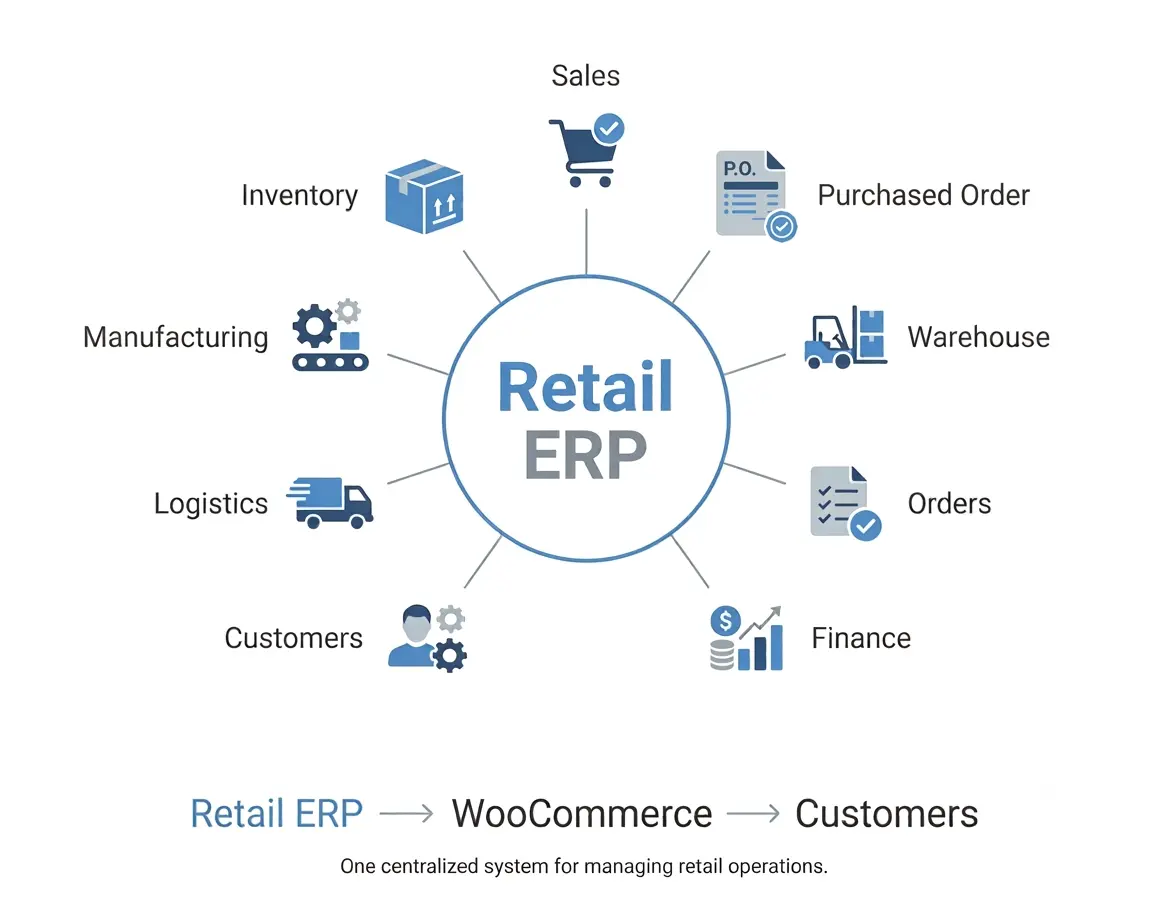
Source: webkul.com
What Order Management Integration Really Means for WooCommerce Stores
Before diving into the technical steps, it's worth clarifying what order management integration actually means in practice—and why it matters beyond the buzzword. Order management integration refers to the automated synchronization of order data between WooCommerce and other business systems, such as inventory management solutions, ERPs, accounting software, and shipping carriers. At its core, integration eliminates the need for manual re-keying of customer orders into separate platforms, creating a seamless data pipeline from cart to delivery.

Source: apps.shopify.com
Why Store Managers Need Order Management Integration
Without integration, store managers face a familiar set of daily hurdles that erode efficiency and profitability:
- Order data entry errors that lead to shipping the wrong products or incorrect quantities
- Inventory discrepancies between the website and actual stock levels, causing overselling or stockouts
- Delayed order fulfillment caused by manual data transfer across disconnected systems
- Poor customer visibility into order status, tracking details, and delivery timelines
- Time-consuming reconciliation between sales channels, payment gateways, and accounting records
The operational benefits of order management integration fall into three categories: speed, accuracy, and visibility. By connecting your order management systems, you streamline these workflows, giving you a single, unified view of every transaction. Instead of juggling multiple dashboards, all order information—payment details, shipping addresses, fulfillment status, and inventory impact—stays synchronized in real time. This centralized approach not only reduces operational friction but also empowers store managers to make data-driven decisions about stocking, staffing, and customer service.

Source: storeconnect.com
The Core Connection Points for WooCommerce Orders
To build an effective order management system, you need to identify which systems your orders must interact with. Most store managers connect WooCommerce to the following categories, each addressing a critical aspect of the order lifecycle:
1. Inventory and Warehouse Management Systems (WMS)
Order and inventory data are inherently linked. When a customer purchases a product, stock levels must decrease immediately to prevent overselling. Integrating WooCommerce with a WMS or inventory tool ensures:
- Real-time stock level updates across all sales channels, preventing overselling
- Automated low-stock alerts for replenishment planning and procurement
- Accurate backorder and pre-order management, reducing customer disappointment
- Seamless pick, pack, and ship workflows for warehouse staff, minimizing fulfillment time
2. ERP and Accounting Platforms
Financial accuracy depends on order data flowing into your accounting system without manual intervention. Integrating WooCommerce with platforms like QuickBooks, Xero, or a full ERP syncs:
- Transaction records and payment data for accurate revenue tracking
- Tax calculations and automated invoice generation, reducing compliance risk
- Refund and chargeback tracking to maintain clean financial books
- Profitability reporting by product, channel, or customer segment
3. Shipping Carriers and Fulfillment Providers
Once an order is confirmed, it needs a shipping label and tracking number. Integration with carriers like UPS, FedEx, or DHL, or with third-party logistics (3PL) providers, automates the process of rate calculation, label printing, and tracking number submission back into WooCommerce. This automation reduces shipping errors and accelerates the time from order placement to dispatch.
4. Marketing and Customer Service Tools
Order data enriches your customer relationships and enables personalized communication. Syncing orders to your CRM or email marketing platform allows you to send triggered campaigns—such as post-purchase follow-ups, shipping notifications, or win-back offers for abandoned orders. A CRM integration might automatically create a customer profile with order history, enabling support agents to resolve issues without asking customers to repeat information they've already provided.
Consider a store selling specialty coffee equipment. When a customer orders a grinder and beans, the integration ensures the WMS deducts both items from inventory, the accounting system records the sale, and the shipping carrier receives the correct weight-based rate—all within seconds of checkout. That's the power of well-executed order management integration in WooCommerce.
How to Integrate Order Management in WooCommerce: A Step-by-Step Approach
Integrating order management in WooCommerce involves a structured approach. Following a clear process prevents costly mistakes, ensures long-term reliability, and maximizes the return on your integration investment.
Step 1: Audit Your Current Order Management Workflows
Before connecting anything, map out how orders currently move through your business. Document every manual step, each system involved, and where errors typically occur. This audit helps you identify which integration points deliver the highest value first. For example, if inventory discrepancies are your biggest pain point, prioritize WMS integration over marketing tools.
Step 2: Choose Your Integration Method for WooCommerce
There are three primary approaches to connecting WooCommerce with external systems. This is the most consequential decision you'll make, so consider each option carefully based on your technical resources and operational complexity:
Native Plugins: Many software providers offer dedicated WooCommerce plugins. These are the easiest to set up, requiring minimal technical knowledge, and provide out-of-the-box functionality for order sync. Choose this if you have limited development resources and your needs align with standard features. They are ideal for small to medium-sized stores seeking quick wins.
Middleware or Integration Platforms: Tools like Zapier, Make, and Automate.io act as bridges between WooCommerce (via REST API) and dozens of other applications. They offer flexibility without custom development and are excellent for connecting multiple systems with moderate complexity. Choose this if you want visual, code-free workflow design and need to automate cross-platform processes without heavy IT involvement.
Custom API Development: When you have complex, unique requirements, a custom integration built on the WooCommerce REST API provides complete control. This approach requires a developer but delivers the highest level of customization, scalability, and data governance. Choose this if you have intricate fulfillment networks, proprietary systems, or scaling needs that off-the-shelf solutions can't accommodate.
Step 3: Map Data Fields Between Systems
Successful integration depends on field mapping—matching customer names, addresses, SKUs, prices, and order statuses across your WooCommerce store and target systems. This is where data standardization becomes crucial:
- Define which order statuses trigger which downstream actions (e.g., "Processing" initiates fulfillment, "Completed" updates accounting records)
- Standardize product identifiers like SKUs to ensure items are recognized correctly across all platforms
- Determine how discounts, taxes, and shipping costs are passed through to maintain financial accuracy
Step 4: Configure Sync Triggers and Real-Time Updates
Decide exactly what triggers data to flow between systems. Real-time sync via REST API calls or webhooks means that events like new orders or status changes instantly update connected platforms. This immediacy is essential for maintaining inventory accuracy and customer satisfaction.
For example, a webhook can notify your warehouse system the moment a customer completes a payment. Similarly, when the warehouse marks an order shipped, the tracking number automatically appears in the customer's WooCommerce order page and notification email—no manual input required.
Step 5: Test Thoroughly Before Going Live
Testing is especially critical for order data because errors here have direct customer consequences—shipping incorrect items, charging wrong amounts, or overselling inventory can damage trust and incur real costs. Plan a staged testing phase across multiple scenarios to validate your order management integration:
- Normal single-item orders to verify basic data flow
- Multi-item orders with varying quantities to test line-item accuracy
- Orders with special shipping instructions or gift notes
- Refunds and partial cancellations to ensure two-way synchronization works
Verify data accuracy in every connected system before processing a single real order through the integration. This diligence pays off in preventing costly customer-facing errors.
Step 6: Monitor Performance and Establish a Feedback Loop
Integration is not a set-and-forget project. Continuously monitor synchronization logs for failed transactions, data mismatches, or API delays. Set up alerts that notify your team when an order fails to sync so you can fix issues quickly before they impact customers. Regular performance reviews also help you identify opportunities for optimization, such as batching operations during peak traffic.
Common Pitfalls in WooCommerce Order Integration and How to Avoid Them
Even well-planned integrations encounter obstacles. Being aware of the most common failure points helps you address them proactively and maintain operational continuity:
- Inconsistent data formats: If your SKUs differ between WooCommerce and your WMS, orders will fail to match. Standardize identifiers before integration, not after, to prevent downstream errors.
- Overlooking webhook failures: Webhooks can silently fail, causing data drift between systems. Implement logging and alerting from day one so you know when synchronization breaks and can act immediately.
- Ignoring API rate limits: Some platforms throttle API calls, which can cause delays during high-volume periods. Design your integration to batch operations during peak traffic rather than hammering endpoints with individual requests.
- Skipping security reviews: Order data includes payment and personal customer information, making it a prime target for breaches. Verify that your integration encrypts data in transit and at rest, and confirm PCI DSS compliance with your payment processor and all connected systems.
Best Practices for WooCommerce Order Management Implementation Success
Your integration's success depends on more than tool selection. Follow these best practices to maximize reliability, minimize risks, and ensure your order management integration delivers lasting value:
- Standardize your data early. Clean, consistent product data prevents most sync errors. Ensure SKUs, pricing structures, and naming conventions are uniform across all systems before you connect anything. This foundational step saves countless hours of troubleshooting later.
- Prioritize two-way synchronization. Integration should not only move order data outward to your fulfillment system but also bring status updates and tracking information back into WooCommerce automatically. This bidirectional flow keeps all stakeholders informed and reduces support inquiries.
- Segment testing into phases. Start with a pilot involving a handful of real orders or a staging environment before rolling out to your entire operational flow. This approach allows you to identify and resolve issues without disrupting your live store.
- Maintain data security compliance. Review how your integration handles data transmission and storage to remain PCI DSS compliant and protect customer privacy. Regular security audits are essential as your integration evolves.
- Document your integration logic. Create a reference guide that details your mapping rules, triggers, and escalation points so any team member can troubleshoot issues effectively. This documentation is invaluable for onboarding new staff and planning future enhancements.
Choosing the Right Order Management Integration Solutions for Your Store
The ideal integration solution depends on your technical resources, budget, and operational complexity. Smaller stores often thrive with lightweight plugins or middleware platforms that require no coding skills, offering a quick path to automation. Enterprise-level operations with intricate fulfillment networks usually benefit from custom API integrations or dedicated ERP systems with native WooCommerce connectors, which provide deeper control and scalability.
Regardless of the solution, selecting tools that offer reliable documentation, active support, and transparent pricing reduces your risk and simplifies future scaling. When evaluating options, ask vendors about their experience with WooCommerce specifically, request case studies from similar businesses in your industry, and test their customer support responsiveness before committing. A vendor that understands WooCommerce's nuances will be a more valuable long-term partner.
The Future of Order Management Integration in E-Commerce
E-commerce tools evolve rapidly, and order management integration is no exception. AI-driven order routing can now automatically direct orders to the optimal fulfillment center based on inventory proximity and shipping costs, reducing delivery times and expenses. Headless commerce architectures are decoupling front-end experiences from back-end operations, making integration layers even more critical for data consistency. As these technologies mature, store managers who build flexible, well-documented integration foundations today will be positioned to adopt new capabilities without rebuilding their entire stack.
Conclusion
Order management integration in WooCommerce transforms order processing from a manual, error-prone chore into an automated, streamlined workflow. By connecting your store to inventory systems, accounting platforms, shipping carriers, and marketing tools, you regain control over operations and also build a foundation for sustainable growth. The benefits extend beyond efficiency—they include improved customer satisfaction, reduced operational costs, and the agility to scale without breaking.
The path to integration is not a single purchase but a deliberate process of auditing, mapping, testing, and refining. Begin with one high-value connection—perhaps inventory or accounting—and expand only once you've verified reliability. Done properly, order management integration becomes the operational backbone that lets your store scale without sacrificing the accuracy your customers depend on.
Start by auditing your current processes, identifying your highest-value integration points, and selecting a solution that matches your team's capabilities. A deliberate, tested integration approach will ensure your store operates smoothly, no matter how high your order volume climbs. The time to act is now—your customers, your team, and your bottom line will thank you.
---
Ready to streamline your order operations? Subscribe Now for expert insights on WooCommerce integration, automation strategies, and e-commerce growth tactics delivered straight to your inbox. --- Labels:
0 comments:
Post a Comment