
Source: www.researchgate.net
The modern web demands real-time, personalized experiences, and static content no longer suffices. For agencies, copywriters, designers, and AI enthusiasts, the challenge lies not merely in creating compelling content, but in building a seamless ecosystem where WordPress serves as the central hub of a broader digital infrastructure. This guide explores WordPress API integration in depth, offering a strategic roadmap for connecting your website to the external services that drive business growth. Whether you need to pull live inventory data, automate content, or leverage large language models for dynamic interactions, mastering custom WordPress API integration is the key to unlocking your platform's full potential. With the right approach to connecting WordPress to external systems, you can transform a static site into a powerful, data-driven application.
However, the path to successful WordPress external API integration is fraught with technical complexities, security vulnerabilities, and potential performance bottlenecks. Understanding these challenges—and knowing to navigate WordPress REST API integration properly—is the first step toward mastering the art of digital connectivity.
The Challenge ofilos in Modern Web Development
Before delving into the technical mechanics, it is crucial to understand the that custom WordPress API integration seeks to solve: the data silo. In many organizations, business data remains trapped in isolated systems. Customer relationship management (CRM) software holds client information, Resource Planning (ERP) manage inventory and logistics, and analytics platforms provide advanced insights. Meanwhile, the website operates independently, serving as static brochure rather than a dynamic business tool.
This disconnect creates operational inefficiencies that directly impact the bottom line. For copywriters and content managers manual data entry leads to inconsistencies and wasted hours. For designers, the inability to access real-time data limits creativity and the sophistication of user interfaces For AI users, a lack of integration means the website cannot react intelligently to user behavior or external stimuli. The consequence is a fragmented user where potential customers fall through the cracks between the marketing site and the backend systems that drive conversion.
Furthermore, the technical barrier to entry is significant. Many agencies rely on disjointed plugins that offer rigid solutions, failing to provide the custom logic required for unique business workflows. When plugins fail to integrate effectively with proprietary or legacy external APIs, the result is broken functionality and frustrated stakeholders. This is where a strategic, engineering-led approach to Press REST API integration becomes indispensable.
Source: wp-umbrella.com
Unlocking Potential with WordPress External API Integration
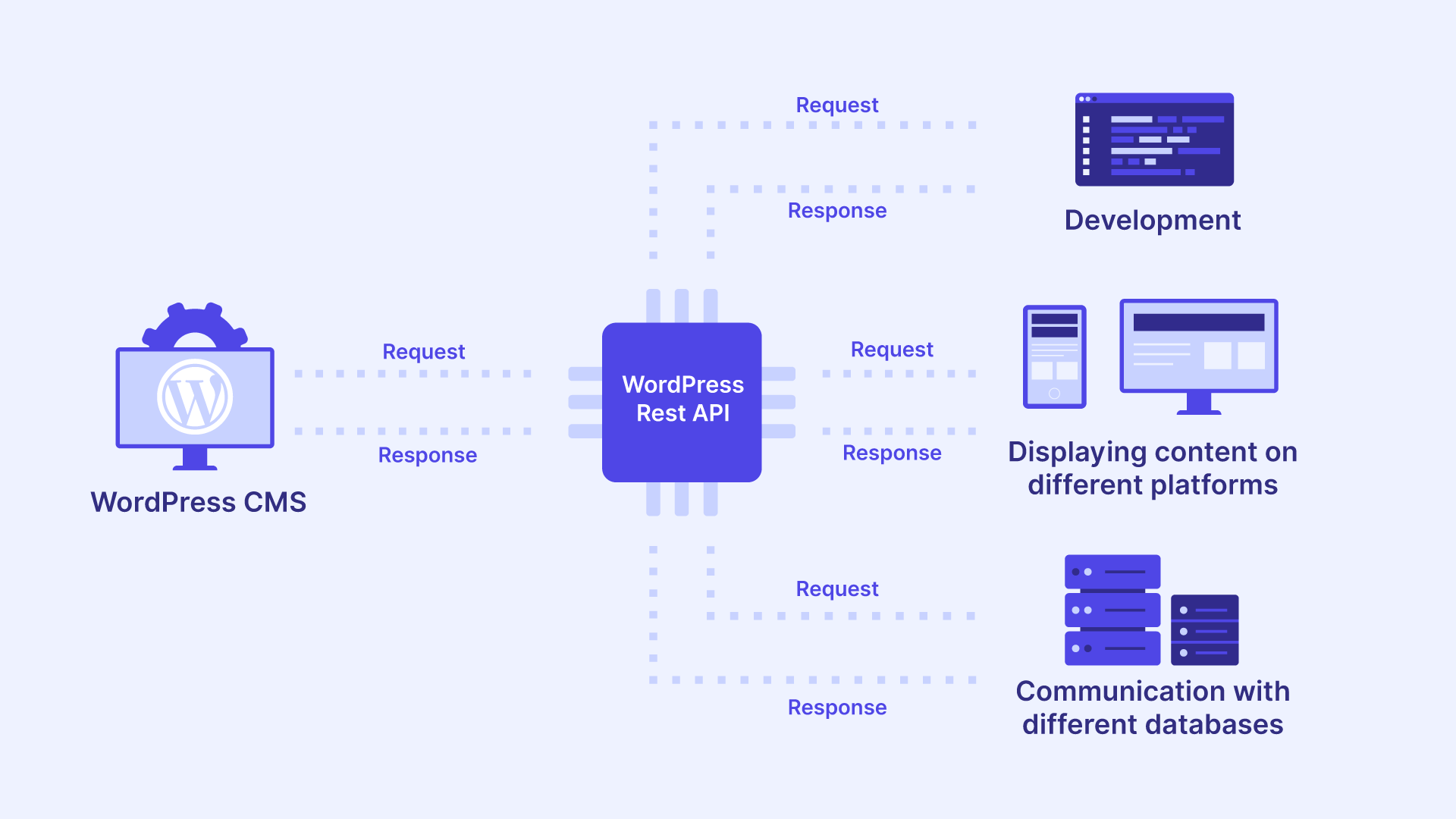
The solution to the data silo is robust connectivity. By integrating external APIs WordPress transforms from a simple content management system into a powerful application platform. This WordPress external API integration for the bi-directional flow of data, enabling websites to fetch information from external sources and send data based on user interactions.
Imagine a scenario a potential client fills out a form on a WordPress page. Instead of merely emailing an administrator, a custom integration instantly pushes this data to Salesforce or HubSpot CRM. Simultaneously, it triggers an AI analysis of lead quality and updates the WordPress dashboard to alert the sales team. level of automation is only possible through meticulous custom WordPress API integration.
For designers, this opens a realm of possibilities. You are no longer limited to static content. You can create interfaces that display live stock prices, real estate listings updated every minute, or shipping rates calculated instantly based on user's location. For writers, it means content can be personalized based on user data from external profiles, increasing relevance and engagement.
However, this requires a shift in mindset. It is not enough to install a plugin and hope for the best. It requires strategic architecture that prioritizes security, speed, and scalability—a custom WordPress API integration tailored specifically to the business logic of your organization.
Source: www.captaindns.com
Strategic Planning for WordPress REST API Integration
Successful integration begins long before a single line of code is written. It requires a comprehensive analysis of the data flow and objectives. A haphazard approach to WordPress REST API integration can lead to security vulnerabilities, such as exposing API keys, or performance issues, as slowing down the site due to slow external server response times.
Mapping Data Requirements
The first step in the analysis phase is mapping the flow. You must identify exactly what data needs to be extracted from the external API and where it needs to reside within WordPress. Additionally, you determine what data from WordPress—such user inputs or order details—needs to be transmitted to the external service.
- Identify End: Locate the URLs (endpoints) of the external API that provide access to the required data.
- Data Formatting: Analyze format in which the external API provides information (usually JSON or XML) and ensure WordPress can parse it correctly.
- Frequency of Sync: Determine how often the data needs to be synchronized. Does the inventory update need to happen in real-time, or is a daily cron job sufficient?
Authentication and Security Protocols
Security is paramount when dealing with WordPress API integration. APIs typically require authentication to ensure that only authorized parties can access the data. This is handled via API keys, OAuth tokens, or Basic Auth.
A common pitfall in DIY integrations is hardcoding these credentials into theme files, where they can be exposed if the site is compromised. A professional approach involves storing credentials in environment variables or using encrypted in the WordPress database options table. For high-security projects, especially those involving ERP or CRM systems, implementing OAuth 2.0 is industry standard for secure authorization.
Implementing Custom WordPress API Integration: Technical Approaches
When moving from planning to execution, developers have several methodologies their disposal. The choice of approach depends on the complexity of the project, the volume of traffic, and the specific requirements of the external API### Method 1: Leveraging the WordPress HTTP API
WordPress comes with a built-in HTTP API that simplifies the process of making external requests. Functions like wp_remote_get() and wp_remote_post() are the building blocks of WordPress external API integration These functions handle the cURL or transport layer, ensuring compatibility across server environments.
For example, to fetch data from an external service, a developer would use wp_remote_get() to retrieve the data, parse the JSON response with json_decode(), and then render the data using shortcodes or block patterns. This method is ideal for small to moderate integrations where data fetching is triggered by page load.
Method 2 Custom Endpoints and Webhooks
For complex scenarios, such as CRM integration or ERP integration, the website needs to listen for data, not just fetch it. This involves creating custom REST API endpoints within WordPress using the register_rest_route() function. These endpoints act as receivers webhooks sent by external services.
When an event occurs in an external system—such as a new purchase in an ERP—that system sends a webhook to the WordPress custom endpoint. WordPress processes this data to update inventory, send confirmation emails, or update user roles. This event-driven is essential for maintaining data consistency across platforms and is a cornerstone of advanced WordPress REST API integration.
Method 3: Asynchronous for Performance
One of the critical considerations in WordPress REST API integration is performance. If the page load has to wait for an server to respond before rendering, the user experience will suffer. Latency from external servers can slow down a WordPress site significantly, affecting SEO and user retention.
To mitigate this, expert developers implement asynchronous processing. Instead of fetching data in real-time during the user's visit, the site relies cached data. Background processes (such as WP-Cron or custom queue systems) fetch fresh data from the API and update the cache. This ensures that the user always sees a fast-loading page while still receiving relatively up-to-date information—a critical balance in any WordPress external integration project.
Real-World Applications: Enhancing Work for AI, Design, and Content
The theoretical benefits of custom WordPress API are best understood through practical applications relevant to the target audience.
Empowering AI Users
For those working with Artificial Intelligence, the website often serves as an interface for AI models. Through WordPress API integration, a site can send user queries to an external AI API (like OpenAI or Anthropic) and display the responses directly on the frontend. This can be used to create dynamic chatbots, content generation tools, or automated image tagging systems that enhance the user experience without manual intervention. By integrating these APIs directly into WordPress, AI users can maintain control over the user flow leveraging advanced machine learning capabilities.
Streamlining Workflows for Copywriters
Copywriters face the tedious task of updating product or blog posts based on changing market trends. Integrating with an external CMS or a data feed can automate this process. For instance, if a business sells tech products, API integration could pull the latest specifications from the manufacturer's database and update the WordPress product pages automatically. This allows copywriters to focus on high-level strategy and persuasion rather than data entry.
Expanding Creative Horizons for Designers
Designers thrive on creating engaging experiences. WordPress API integration provides the raw materials for these experiences. By accessing mapping data (like Google Maps), weather data, or social media feeds, designers can build dynamic, data-driven layouts that change based on external variables. This transforms web design from static composition to interactive art, engaging users with personalized content relevant to their context and location.
Specialized Integrations: ERP and CRM Ecosystem
While general connectivity is powerful, specific systems require specialized knowledge. Two of the most critical areas for enterprise WordPress are ERP and CRM integration.
Navigating WordPress ERP Integration
Connecting with an ERP system (like SAP, Oracle, or Microsoft Dynamics) is a high-stakes endeavor. This WordPress ERP integration is for e-commerce sites that need to synchronize inventory levels, pricing, and order status in real-time. If the ERP shows an item is of stock, the WordPress site must reflect this to prevent overselling.
The complexity here lies in the volume and sensitivity of the data. A integration must handle bulk updates efficiently without crashing the server. It also requires strict error handling to ensure that a failed sync does not result in data. For businesses looking to scale, investing in professional WordPress ERP Integration Services is often the most prudent choice to ensure reliability and performance.
Mastering WordPress CRM Integration
Similarly, CRM integration is vital for lead generation and customer retention. When a user downloads an ebook or requests a quote, that data should flow into the CRM. This eliminates the need for manual entry and ensures that the sales team can act on leads immediately.
Advanced CRM integration can work in reverse, pulling customer data from the CRM to personalize the WordPress experience. A logged-in user might see a customized dashboard showing their order history, support tickets, personalized recommendations based on previous interactions. This level of personalization fosters loyalty and increases lifetime value. Exploring professional WordPress CRM Integration Services can provide these capabilities without the technical headache of building them from scratch.
Common Pitfalls and How to Avoid Them
Even with a solid plan, WordPress API integration is susceptible to that can derail a project. Recognizing these pitfalls is a key component of successful implementation.
Ignoring Rate Limits: Most external have rate limits, restricting the number of requests you can make in a given timeframe. Ignoring these limits can result in your IP being banned. A robust integration must include logic to queue requests and respect these limits.
Poor Error Handling: External services can go down. If integration does not account for API failures, it can crash your website. Always implement try-catch blocks and fallback mechanisms. If the API is unreachable, the site should still function, perhaps displaying cached data or a graceful error message.
Neglecting Caching: As mentioned, fetching data on every page load is a recipe for disaster. Utilizing the WordPress Transients API or object caching is essential for maintaining site speed any WordPress external API integration.
Data Inconsistencies: Sometimes, the data structure of an external API changes. A flexible integration should be able to handle unexpected data formats without breaking the frontend.
Skipping Documentation: Every API has its own quirks and conventions. Failing to thoroughly read the provider's documentation leads to incorrect assumptions and integration failures. Proper due diligence is essential before any code.
The Business Case for Professional Implementation
While tutorials exist for basic integrations, enterprise-grade custom WordPress API integration requires a depth of knowledge that goes beyond simple coding. It requires an understanding of server architecture, security protocols, and business logic. A poorly implemented integration become a liability, creating security holes and performance bottlenecks that cost more to fix than the initial development would have.
Furthermore, the time investment required learn the intricacies of a specific proprietary API, test the connection, and maintain it over time is significant. For agencies and businesses, time is money. Outsourcing this complex task to specialists allows your internal team to focus on what they do best—creating compelling content and stunning designs—while the technical infrastructure is handled by experts.
Conclusion: Transforming WordPress into a Connected Powerhouse
The integration of external APIs is no longer a novelty; it is a fundamental requirement for competitive, high-performance websites. Whether through WordPress REST API integration, connecting with ERPs CRMs, or leveraging the power of AI, the ability to seamlessly exchange data between WordPress and the outside world transforms the platform into a potent engine.
For AI users, copywriters, and designers, the message is clear: do not let the limitations of a static environment constrain your vision. By embracing custom WordPress API integration, you can automate the mundane, personalize the user experience, and deliver interactions that drive engagement and conversion.
However, the complexity of these systems demands professional expertise. Security, performance, and reliability are not areas for compromise. To ensure your integration is built on a foundation of code excellence and strategic foresight, you need a partner who understands the landscape.
If you are ready to elevate your WordPress from a static brochure to a dynamic, data-driven application, it is time to take the next step. Hire A Developer today to architect a solution that is secure, scalable, and tailored specifically to your needs. Explore our specialized Press API Integration Services and discover how we can help you unlock the full potential of your digital ecosystem. For those looking to build robust, custom endpoints, our experts are available for REST API Development.
Frequently Asked Questions
What is WordPress API Integration?
WordPress API integration is the process of connecting your WordPress website to external applications or services to exchange data. This allows your site to send information, or retrieve information from, third-party systems like CRMs, ERPs, or AI tools, enabling automated and dynamic content display.
is Custom WordPress API Integration Better Than Using Plugins?
While plugins offer pre-built solutions, they are often limited in scope and flexibility. Custom WordPress API integration allows developers to build specific logic tailored to your unique business requirements, ensure higher security standards, and optimize performance for your specific data volume and traffic needs.
How Does WordPress REST API Integration Work?
WordPress REST API integration uses standard HTTP protocols (GET, POST, PUT, DELETE) to communicate with the WordPress REST API or other RESTful services. It allows developers to interact with WordPress data remotely or fetch data into WordPress through structured endpoints that return JSON data.
Is API Integration Secure?
When implemented correctly, **WordPress external API integration is secure. It involves using authentication methods like OAuth 2.0, API keys, and encryption to protect data in transit. However, implementation—such as hardcoding credentials in public files—can create security vulnerabilities. This is why it is recommended to hire a developer with expertise security protocols.
How Much Does It Cost to Integrate an External API with WordPress?
The cost varies widely depending on the complexity of the, the volume of data, and the specific functionalities required. Simple integrations might be relatively straightforward, while WordPress integration or ** integration** requires a significant investment in planning and development to ensure reliability and security.



0 comments:
Post a Comment