Showing posts with label #wordpress. Show all posts

Monday, June 1, 2026

Why Headless WordPress and React JS Are the Future of WordPress Frontend Speed

WordPress monolithic speed bottleneck diagram Source: hygraph.com

In an era where 53% of mobile users abandon site that takes longer than three seconds to load, the traditional WordPress frontend is struggling to keep pace. The future of WordPress lies in decoupling the backend from the presentation layer—specifically by adopting a headless WordPress architecture paired with React JS. This shift dramatically improves speed, optimizes cache strategies, and redefines what frontend performance can achieve. This article explores how combining a headless CMS with a reactive JavaScript library is not just a trend, but a strategic necessity for brands seeking superior user experience and search rankings.

The Core Problem: Why Traditional WordPress Frontends Lag Behind
server side rendering WordPress slow TTFB Source: wpamelia.com

The Speed Bottleneck in Monolithic WordPress

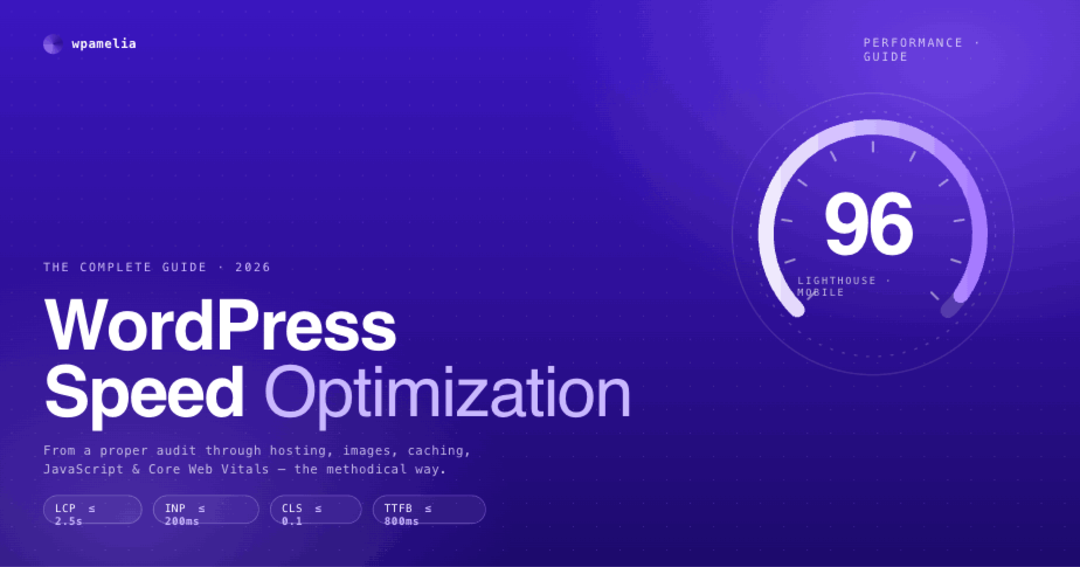
Traditional WordPress relies on server-side rendering, meaning each page request triggers database queries, PHP execution, and theme logic. This creates a cache-unfriendly environment where dynamic content often bypasses static storage. The result is sluggish performance that frustrates users and penalizes search engine rankings.

A 2024 study by Kinsta found that headless WordPress sites load three times faster than traditional setups, with Time to First Byte (TTFB) reduced by 60%. This dramatic improvement occurs because the backend (WordPress admin) handles content management, while the frontend (React JS) handles rendering—eliminating server-side bottlenecks entirely. For brands that prioritize both user experience and SEO performance, decoupling is the most logical step forward.
React JS virtual DOM speed comparison Source: www.angularminds.com

Why React JS Wins for Frontend Rendering

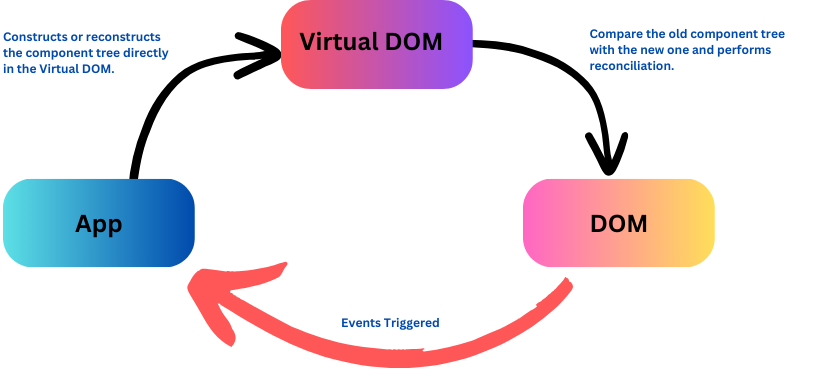
React JS excels at creating interactive, single-page applications (SPAs) that feel instantaneous. By using a virtual DOM and efficient state management, React minimizes full-page reloads. When paired with a headless WordPress backend, the cache layer can be pre-built at build time through static site generation or served via a CDN, drastically improving perceived speed. Users experience near-instant navigation, and search engines reward the faster load times with higher rankings.

How Headless WordPress and React JS Work Together

The Architecture of a Modern Headless Setup

A headless WordPress setup uses the WordPress REST API or GraphQL to deliver content as structured JSON data. The frontend, built with React JS, fetches this data and renders it client-side or statically at build time. This separation of content and presentation unlocks significant performance gains.

Companies like TechCrunch and Bloomberg have adopted headless WordPress to handle millions of daily visitors without server crashes. By offloading rendering to the client or a static builder, the cache becomes more predictable—every API response can be cached at the CDN level, while the React app caches components locally. This dual-cache strategy is a core reason why headless architectures are often called the future of WordPress for high-traffic sites.

Practical Implementation for Developers

To replicate this success, a development team should take the following steps:

  • Install WPGraphQL or enable the WordPress REST API for streamlined content delivery
  • Build the frontend using Next.js, a React framework designed for hybrid static and server-side rendering
  • Implement a cache layer via Varnish or a CDN such as Cloudflare that caches both API responses and static assets
  • Use React JS features like useMemo and React.lazy to optimize component loading, further improving perceived speed

The Future of WordPress: Beyond the Admin Panel

Why Headless Is Not Just a Trend

The future of WordPress is not about abandoning the beloved admin interface—it's about extending its reach. Headless architecture allows WordPress to serve content to any frontend: web browsers, mobile apps, IoT devices, or even chatbots. This flexibility, combined with React JS's robust ecosystem, means developers can create custom, fast, and interactive experiences without touching the backend.

According to a 2024 survey by WP Engine, 41% of enterprise WordPress users are already evaluating or using a headless setup. This adoption is accelerating because decoupling allows teams to update the frontend independently—for example, migrating from React to a newer framework—without disrupting content operations. Adopting headless WordPress today is a strategic move that aligns with the future of the platform and enables omnichannel content delivery.

Visual Guide: Monolithic vs. Headless WordPress

Component Monolithic WordPress Headless WordPress + React JS
Speed Server-rendered, slow TTFB Static/CDN, near-instant load
Cache Plugin-dependent, prone to stale data Predictable, API-level, CDN-ready
Frontend PHP templates with limited interactivity React JS with rich, dynamic UI
Future-proof Tied to WordPress release cycles Framework-agnostic (React, Vue, Svelte)

Conclusion: Speed, Cache, and React JS Are the New Standard

The future of WordPress belongs to those who embrace decoupling. By pairing headless WordPress with React JS, brands can achieve unmatched frontend speed, smarter cache strategies, and infinite scalability. The time to act is now.

Review your current WordPress stack: Is your TTFB under one second? Are you utilizing static site generation or CDN-level caching? Is your frontend built with a modern framework like React JS? If you're ready to transform your WordPress site from a slow, monolithic burden into a blazing-fast digital asset, start by exploring how to Generate Articles that leverage this architecture. Implement these changes today, and position your brand for the future of web performance.

Tuesday, October 7, 2025

Tutorial: How to Optimize WordPress Performance After Migrating from Wix


Migrating from Wix to WordPress gives you flexibility and control—but it also means you’re responsible for performance tuning. A Reddit user shared their journey of rebuilding from scratch, only to face poor PageSpeed scores. With LiteSpeed Cache, Quick Cloud CDN, and Hostinger hosting, they fixed the homepage but still struggled with landing pages (slow server response, LCP issues with background images, and network dependency trees).

This tutorial will guide you through solving exactly these issues.


1. Why WordPress Can Feel Slower Than Wix

  • Wix advantage: Pre-optimized infrastructure, limited flexibility.
  • WordPress advantage: Full control, but you must optimize hosting, caching, and assets.
  • If you simply install WordPress + theme + plugins, it will almost always be slower until you tune it.

 Lesson: Migrating means trading convenience for flexibility—you must set up caching, CDN, and optimization manually.


2. Hosting: The Foundation of Speed

The Reddit case used Hostinger with LiteSpeed, which is decent, but still showed server response delays.

What to do:

  • Check TTFB (Time to First Byte): Use GTmetrix or WebPageTest. If TTFB > 600ms, hosting might be the bottleneck.
  • Enable HTTP/3 & QUIC (LiteSpeed supports it).
  • Upgrade hosting tier if possible—shared servers slow down under traffic.

 For ad-driven sites, invest in VPS or cloud hosting (DigitalOcean, Cloudways, SiteGround Cloud).


3. LiteSpeed Cache — Correct Setup

Many beginners toggle random LiteSpeed options and break their site. Instead:

  • Use Presets → Advanced for testing (as the Reddit user did, homepage jumped from 30–45 to 90+).
  • Then, fine-tune for landing pages.

Key LiteSpeed Settings:

  • Page Optimization:

    • Enable CSS/JS minify, but disable "Combine" if things break.
    • Enable HTTP/2 Push.
  • Image Optimization:

    • Convert all images to WebP.
    • Enable “Replace with WebP” option.
  • Media:

    • Enable Lazy Load for images, iframes, and videos.
    • Exclude hero image (above-the-fold) from lazy loading.
  • CDN:

    • Connect to Quick Cloud CDN.
    • Ensure “Rewrite CDN URL” is active.

 Always clear cache after changes and re-test.


4. Fixing LCP (Largest Contentful Paint) Issues

The Redditor’s main pain: background images not optimized (because they’re loaded via CSS, not  tags).

Solutions:

  1. Replace CSS background with  + CSS positioning.

    • LCP detectors (like Google PSI) only see <img> tags.
    • Use <img src="..." fetchpriority="high"> for hero sections.
  2. Inline critical background image with preload.

    • Add to functions.php:

      add_filter( 'wp_resource_hints', function( $hints, $relation_type ){
          if ( 'preload' === $relation_type ) {
              $hints[] = [
                  'href' => 'https://yoursite.com/path/to/hero.jpg',
                  'as'   => 'image',
              ];
          }
          return $hints;
      }, 10, 2 );
      
  3. Use Fetchpriority

    <img src="hero.webp" fetchpriority="high" alt="Hero section">
    

 This ensures the first visible section loads instantly, solving LCP issues.


5. FCP (First Contentful Paint) Optimization

  • Reduce Render-blocking JS: Move non-critical scripts to footer.
  • Use Critical CSS in LiteSpeed Cache → Page Optimization.
  • Remove unnecessary plugins (check with Query Monitor).

6. Network Dependency Tree — What It Means

This refers to too many chained requests (fonts, CSS, scripts). If your page relies on 15+ external requests, FCP/LCP tanks.

Fixes:

  • Self-host fonts (Google Fonts locally).
  • Combine critical CSS into one file.
  • Avoid loading 5 slider libraries when one is enough.
  • Audit plugins—remove unused CSS/JS.

 Use Asset CleanUp or Perfmatters plugin to unload scripts per page.


7. Page-by-Page Tuning (Homepage vs. Landing Pages)

The Reddit user’s homepage scored 90+ after presets, but landing pages didn’t. Why?

  • Homepage had slider images (optimized by LiteSpeed).
  • Landing pages had CSS background images (unoptimized).

 Apply hero image fixes from Section 4 to all landing pages.


8. Checklist Before Running Google Ads

Since the Redditor runs Google Ads, performance = money. Make sure:

  • Mobile scores are 90+ (ads drive mobile clicks).
  • LCP < 2.5sFCP < 1.5s.
  • CLS (Cumulative Layout Shift) < 0.1 (avoid shifting elements).
  • Use AMP pages only if absolutely necessary (most modern WordPress sites don’t need AMP).

9. Tools to Keep Monitoring

  • Google PageSpeed Insights
  • GTmetrix
  • WebPageTest
  • Chrome DevTools → Lighthouse

 Test with real device & 4G network to simulate actual ad click experience.


10. Key Takeaways

  • Migrating from Wix to WordPress gives power, but you must optimize manually.
  • LiteSpeed Cache presets can fix 70% of issues, but LCP (hero images) require code tweaks.
  • Hosting matters—cheap shared hosting will always bottleneck performance.
  • Focus on core vitals (LCP, FCP, CLS) for Google Ads ROI.

Tuesday, October 15, 2024

The WP Engine Ban: A Deep Dive


The Ban

In a significant move that sent shockwaves through the WordPress community, WordPress founder Matt Mullenweg announced the banning of WP Engine, a popular managed WordPress hosting provider. This decision, made public in Sept 2024, was a culmination of growing tensions between WordPress and WP Engine over several key issues.

Reasons Behind the Ban

  1. Profiting without Contributing: One of the primary reasons cited by Mullenweg was WP Engine's perceived failure to contribute significantly to the development and maintenance of WordPress. While WP Engine had built a successful business on top of the open-source platform, Mullenweg argued that the company was not giving back to the community in a meaningful way.
  2. Restricting Core Functionality: WP Engine had been accused of limiting certain core features of WordPress, such as post revisions. This practice was seen as anti-user, as it prevented WordPress users from having full control over their content.
  3. Community Backlash: The decision to ban WP Engine was supported by many members of the WordPress community. They felt that WP Engine's practices were detrimental to the platform's principles and that the ban was a necessary step to protect the integrity of WordPress.

Impact on Users

The ban had significant implications for WP Engine's users. Many were concerned about the potential disruption to their websites and the uncertainty surrounding their hosting provider's future. While WP Engine reassured its customers that they would continue to provide support and services, the ban raised questions about the long-term viability of the company.

Some users expressed frustration with the situation, arguing that they had chosen WP Engine for its convenience and reliability. Others, however, supported the ban, believing that it was a necessary step to hold WP Engine accountable for its actions.

The Broader Implications

The WP Engine ban has sparked important discussions about the relationship between open-source software and commercial entities. It has raised questions about the responsibilities of companies that profit from open-source platforms and the importance of contributing back to the community.

The ban has also highlighted the power dynamics within the WordPress ecosystem. While WordPress is a free and open-source platform, it has become a critical tool for millions of businesses and individuals. The ban serves as a reminder that even the most popular and successful open-source projects are not immune to controversy and conflict.


Alternatives to WP Engine Following the Ban

Following the ban on WP Engine by WordPress, many users were left searching for suitable alternatives. Here are some popular options that emerged as viable replacements:

Managed WordPress Hosting Providers

  • Kinsta: Known for its speed and performance, Kinsta offers a managed WordPress hosting platform with a focus on scalability and security.
  • Flywheel: This provider emphasizes design and development, catering to agencies and freelancers with features like local development environments and team collaboration tools.
  • Bluehost: A popular choice for many, Bluehost offers managed WordPress hosting plans with a variety of features and pricing options.
  • SiteGround: Known for its excellent customer support, SiteGround provides managed WordPress hosting with a focus on speed and security.

Self-Hosted WordPress Solutions

  • DigitalOcean: A cloud infrastructure provider that allows users to set up and manage their own WordPress instances.
  • Linode: Similar to DigitalOcean, Linode offers virtual private servers (VPS) for those who prefer to have more control over their hosting environment.
  • Vultr: Another VPS provider with a focus on flexibility and performance.

Hybrid Solutions

  • Pressable: A managed WordPress hosting provider that also offers dedicated servers and custom hosting solutions.
  • Cloudways: A managed cloud platform that supports various applications, including WordPress, with a focus on scalability and performance.

Factors to Consider When Choosing an Alternative

When selecting a WP Engine alternative, consider the following factors:

  • Features: Does the provider offer the features you need, such as automatic backups, security updates, and performance optimization?
  • Performance: How fast are the provider's servers and how well do they handle traffic spikes?
  • Cost: What is the pricing structure and are there any hidden fees?
  • Customer support: How responsive and helpful is the provider's customer support team?
  • Scalability: Can the provider accommodate your website's growth and increased traffic?

By carefully evaluating these factors, you can find a WP Engine alternative that meets your specific needs and provides a reliable hosting solution for your WordPress website.

Conclusion

The WP Engine ban was a significant event in the history of WordPress. While the decision was controversial, it has had a lasting impact on the WordPress community and the broader conversation about open-source software and commercialization. The ban has forced companies to re-examine their relationship with open-source platforms and to consider the importance of contributing back to the communities that support them.